
Stop using Claude Code like a chatbot
The Claude Code config Boris Cherny actually runs — settings.json layers, permissions, plan mode, memory, hooks, skills, subagents, MCPs, sandboxing, and the 5-worktree workflow.
TL;DR
- Run 5 Claudes in parallel via git worktrees with numbered terminal tabs — Boris Cherny's top productivity tip, no exceptions.
- Use plan mode → auto-accept edits every PR. Pour energy into the plan, then watch Claude one-shot the implementation.
- Keep CLAUDE.md under 200 lines. After every correction, append: "Update your CLAUDE.md so you don't make that mistake again."
- Install 5 MCPs only — Context7, GitHub, Playwright, Postgres/Supabase, Slack or Sentry. MCP tool descriptions cost context every session, forever.
- Hooks are guarantees; CLAUDE.md is advisory. If a rule must hold, make it a hook — not a bullet point.
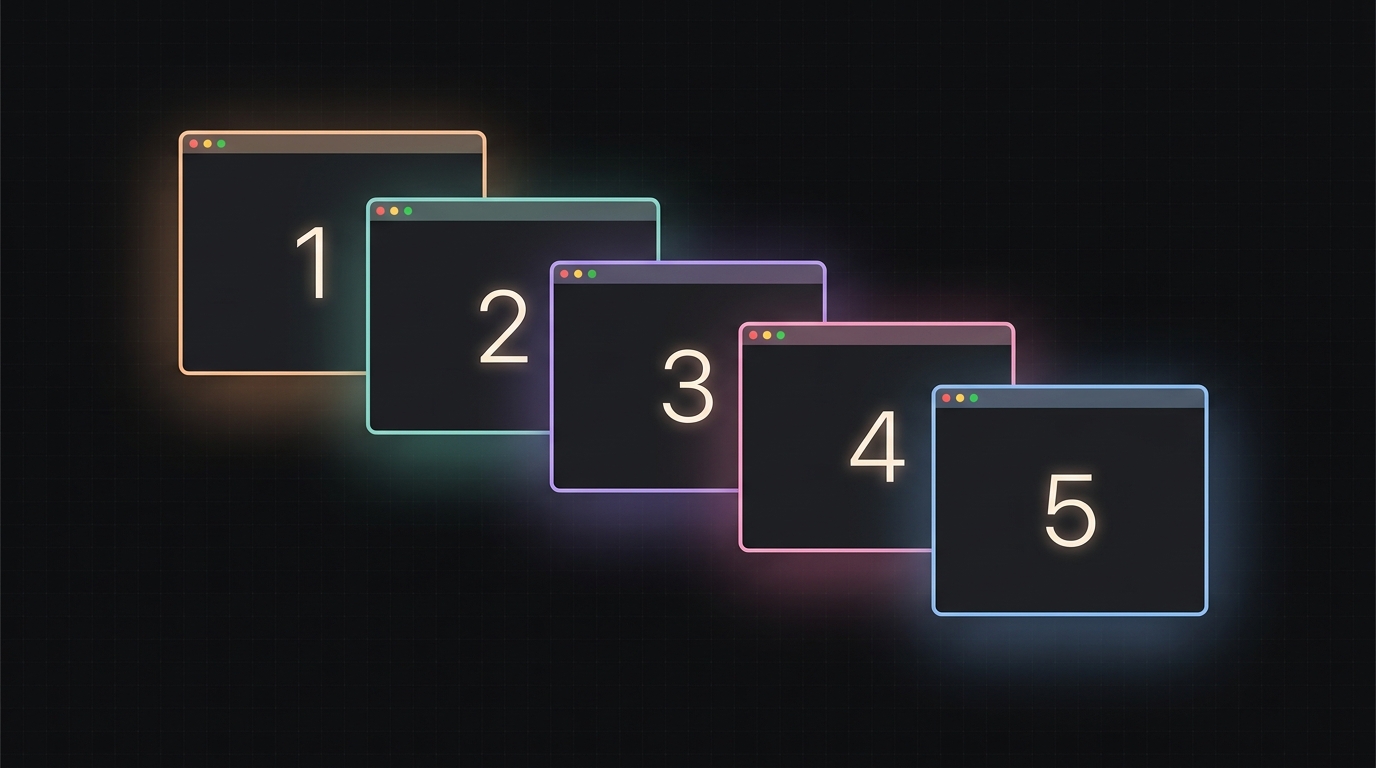 Boris Cherny’s signature workflow: five Claudes running in parallel via git worktrees, with numbered terminal tabs.
Boris Cherny — the engineer who built Claude Code — runs five Claudes in parallel using git worktrees and numbered iTerm tabs. He calls it his “single biggest productivity tip.” Most engineers spend months ignoring it, treating Claude like a smarter autocomplete, and wondering why their output looks the same as everyone else’s.
The fix is to rewrite the setup from scratch. New settings.json with all five layers reasoning together. Five hooks. Three skills. Five MCPs. One 65-line CLAUDE.md. A statusline worth looking at. The difference is not subtle — it is the gap between “this is a neat tool” and “this is the way the work gets done now.”
This is that setup, end to end. Every config below is copy-pasteable, every shell script is complete, and every claim traces back to either Boris’s threads, the official Anthropic docs (synthesised through release v2.1.119), or one of the 30+ GitHub repos that together collected over 800,000 stars in the last year. No hedging — direct prescriptions, with the reasoning attached.
Three Boris Cherny threads anchor most of the workflow advice that follows:
- How I use Claude Code — Jan 2 2026, 54K likes, 8.1M views, 104K bookmarks
- 10 tips from the Claude Code team — Jan 31 2026, 51K likes, 9.1M views, 104K bookmarks
- Dogfooding Opus 4.7 — Apr 16 2026, 12K likes, the source of Auto Mode,
xhigheffort, and the/fewer-permission-promptsskill
TL;DR
- Run 5 Claudes in parallel via git worktrees with numbered terminal tabs. Boris’s #1 tip from his 9M-view January thread, no exceptions.
- Use plan mode → auto-accept edits every PR. Pour energy into the plan, then watch Claude one-shot the implementation.
Shift+Tabcycles between modes. - Keep
CLAUDE.mdunder 200 lines. After every correction, append: “Update your CLAUDE.md so you don’t make that mistake again.” - Internalise the 5-layer config hierarchy (managed → CLI → local → project → user) so you stop being surprised by which value wins.
/statusshows the resolution path. - Set
opusplanas your default model. Opus to plan, Sonnet to execute, automatic switch. - Build a
/goskill that verifies, simplifies, and opens the PR. Boris: “2-3x quality of final result.” - Install 5 MCPs only — Context7, GitHub, Playwright, Postgres/Supabase, Slack or Sentry — and prefer CLI tools (
gh,bq,aws) when one exists. MCP descriptions are permanent context tax. - Make every “must hold” rule a hook, not a
CLAUDE.mdbullet. Hooks are guarantees; CLAUDE.md is advisory. - Use skills for reusable workflows; let descriptions do the heavy lifting via trigger phrases. Skills load on demand, CLAUDE.md loads every session.
- Enable sandboxing (
/sandbox) and the four-mode permission cycle. Never use--dangerously-skip-permissionsoutside an isolated VM. - Burn this prompt into muscle memory: “Knowing everything you know now, scrap this and implement the elegant solution.”
- Add voice input (Wispr Flow, fn-fn dictation). You speak 3x faster than you type and your prompts get measurably more detailed — better context in, better results out.
The 5-Minute Setup
If you only read one section, read this. Get a quick win, then come back for the deep dive.
# 1. Login + scaffold
claude              # OAuth login on first run
cd my-project
claude /init        # bootstraps CLAUDE.md
claude /permissions # configure allow/deny baseline
claude /sandbox     # enable OS-level isolation (Linux/macOS)

# 2. Drop in the recommended ~/.claude/settings.json (full version below)
mkdir -p ~/.claude
$EDITOR ~/.claude/settings.json

# 3. Pull battle-tested skills + agents
git clone --depth=1 https://github.com/wshobson/agents ~/agents-repo
mkdir -p ~/.claude/agents ~/.claude/skills
cp ~/agents-repo/agents/code-simplifier.md ~/.claude/agents/
cp ~/agents-repo/agents/code-architect.md  ~/.claude/agents/
cp ~/agents-repo/agents/team-lead.md       ~/.claude/agents/

# 4. Install the 5 MCPs that actually pay off
claude mcp add --transport http github https://api.githubcopilot.com/mcp/
claude mcp add -- npx -y @upstash/context7-mcp@latest
claude mcp add -- npx @playwright/mcp@latest
claude mcp add -- npx -y @supabase/mcp-server-supabase@latest --read-only
claude mcp add --transport http slack https://mcp.slack.com/mcp

# 5. Paste this into ~/.zshrc for the killer model defaults
export CLAUDE_CODE_EFFORT_LEVEL=xhigh
export ANTHROPIC_DEFAULT_OPUS_MODEL=claude-opus-4-7
Run claude /status after step 5. It prints every settings layer and where each value originated. That command alone saves hours of “why is it doing that?”
The Mental Model: Why Claude Code Works the Way It Does
Before any config, get the mental model right. Claude Code is an agentic coding tool, not a chatbot. The single biggest constraint and opportunity is the context window — performance degrades as it fills, then collapses. Every best practice in this post is downstream of three rules: manage context aggressively, give Claude a way to verify its own work, and separate exploration from execution.
There are three mechanisms that persist context across sessions, and you should use all three:
- CLAUDE.md — instructions you write
- Auto memory at
~/.claude/projects/<project>/memory/MEMORY.md(since v2.1.59) — notes Claude writes itself - Sessions / checkpoints —
claude --continue,claude --resume, the/rewindmenu
Three mechanisms add capability beyond the model:
- Skills — reusable instructions that load on demand
- Subagents — tasks that run in fresh context and return only a summary
- Hooks — deterministic shell, HTTP, or MCP callbacks at lifecycle points
Three mechanisms control safety:
- Permission rules (
allow/ask/deny) - Permission modes (
default,acceptEdits,plan,auto,dontAsk,bypassPermissions) - Sandboxing (OS-level filesystem and network isolation)
Every setting in the next section maps to one of those three triads. If you remember nothing else, remember that hooks are guarantees and CLAUDE.md is advice.
How the Master Config Is Structured
This part confuses most people on first read — drawing out the layers beats guessing.
Claude Code resolves every setting through a five-layer hierarchy. Higher layers override lower ones for scalar values; arrays (like permissions.allow, hooks.PreToolUse) merge and dedupe across layers. That merge behaviour is the single most useful thing to internalise — it’s why a team-shared deny list cannot be silently overridden by a developer’s local file, and it’s why /fewer-permission-prompts can extend your allowlist without stomping it.
The five layers, top wins:
| Layer | Path | Purpose |
|---|---|---|
| 1. Managed (highest) | macOS: /Library/Application Support/ClaudeCode/managed-settings.jsonLinux/WSL: /etc/claude-code/managed-settings.jsonWindows: C:\Program Files\ClaudeCode\managed-settings.jsonPlus managed-settings.d/*.json drop-ins, MDM com.anthropic.claudecode plist, HKLM\SOFTWARE\Policies\ClaudeCode registry, and the Claude.ai admin console | Org-wide enforcement; cannot be removed by users |
| 2. CLI flags | --permission-mode, --allowedTools, --model, --effort, --system-prompt, etc. | One-shot overrides |
| 3. Project local | .claude/settings.local.json | Personal, gitignored |
| 4. Project shared | .claude/settings.json | Committed to git, team-shared |
| 5. User | ~/.claude/settings.json | Cross-project personal |
Plus a sixth file that holds state, not policy: ~/.claude.json stores OAuth tokens, MCP user-scope and local-scope servers, and per-project trust acknowledgements. You generally don’t edit it; Claude Code does.
There’s a parallel hierarchy for CLAUDE.md memory (also five levels — managed, project, project-local, user, plus subdirectory files that load lazily when Claude reads matching files), and one for .claude/rules/*.md files with paths: frontmatter. Both layer the same way: managed > project > user.
The takeaway: when something feels wrong, run /status. Every layer’s contribution to the merged config gets printed with its origin path. As of v2.1.119, even /config writes participate in this precedence chain so settings-file pinning works without surprises.
A few drop-in directories that broaden the picture:
managed-settings.d/— split your enterprise policy across files (e.g.01-permissions.json,02-mcp.json). Easier diffs and conditional includes via deployment tooling.--add-dir <path>— add an external directory to Claude’s working set. SetCLAUDE_CODE_ADDITIONAL_DIRECTORIES_CLAUDE_MD=1to also pullCLAUDE.mdfrom there (otherwise it’s not auto-loaded)..worktreeinclude— file in your project root that copies gitignored files (like.env) into newly-spawned worktrees, so your parallel sessions actually run.
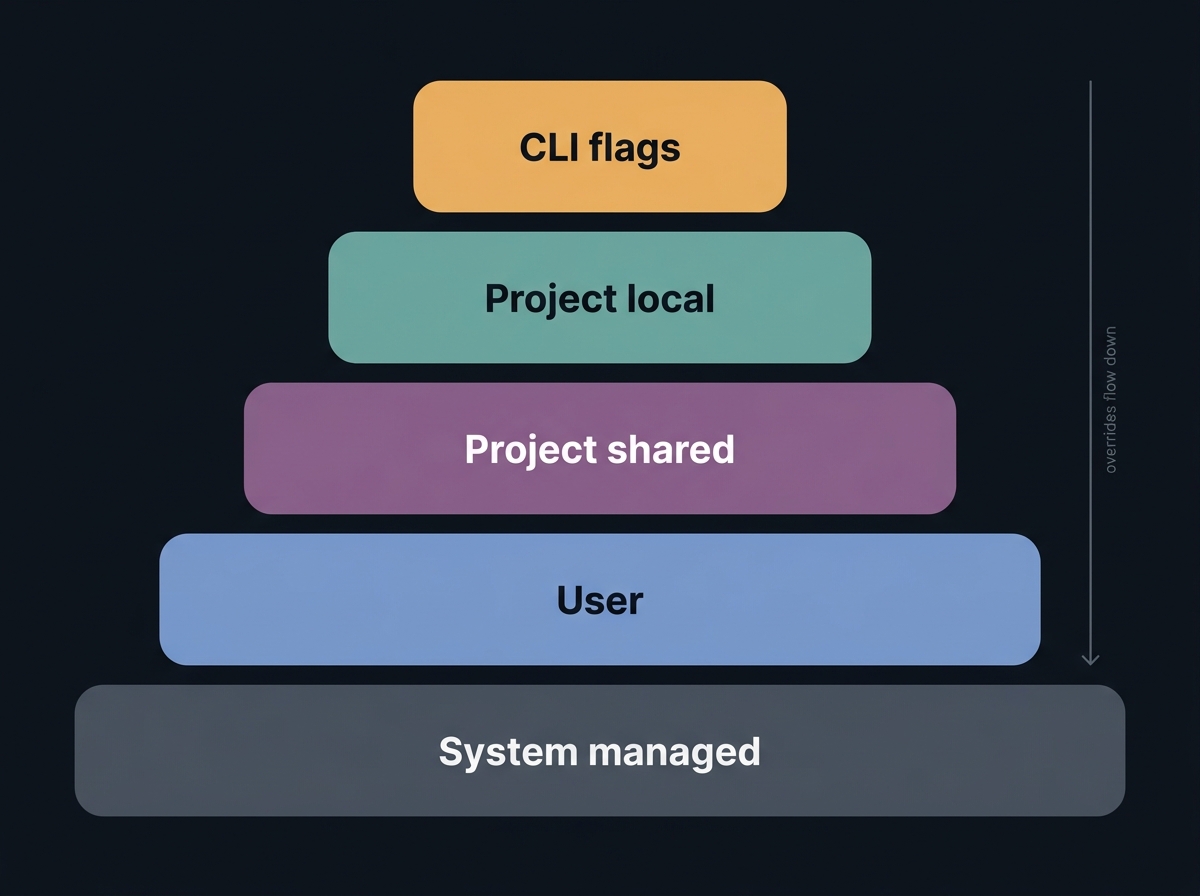 The five settings layers, from managed system policy down to ephemeral CLI flags.
settings.json — The One You Should Actually Use
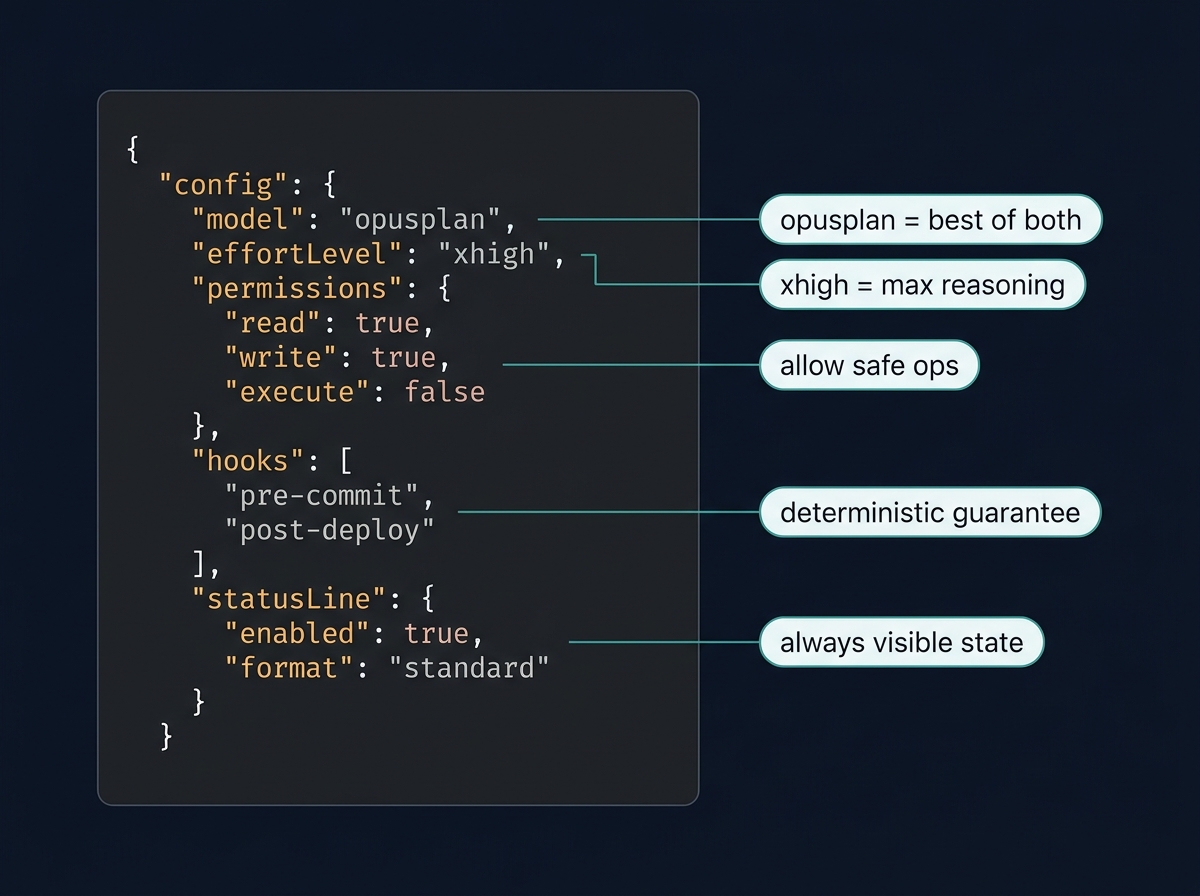 The five fields in
 settings.json that actually move the needle.
Most people set up settings.json once, never touch it, and leave half the value on the table. Permissions cause 60% of friction. Hooks turn advisory rules into enforced ones. The status line tells you when context is dying. None of that happens if you accept defaults.
Drop this at ~/.claude/settings.json. It’s a synthesis of Boris’s team config, the shanraisshan/claude-code-best-practice reference (48K stars), and the official docs through v2.1.119.
{
  "$schema": "https://json.schemastore.org/claude-code-settings.json",

  "model": "opusplan",
  "effortLevel": "xhigh",
  "alwaysThinkingEnabled": true,
  "autoMemoryEnabled": true,
  "outputStyle": "Default",

  "permissions": {
    "defaultMode": "acceptEdits",

    "allow": [
      "Read", "Glob", "Grep", "LS",
      "Bash(npm run lint)",
      "Bash(npm run test:*)",
      "Bash(npm run build)",
      "Bash(pnpm run *)",
      "Bash(yarn *)",
      "Bash(git status)",
      "Bash(git diff:*)",
      "Bash(git log:*)",
      "Bash(git show:*)",
      "Bash(git branch:*)",
      "Bash(gh pr view:*)",
      "Bash(gh pr list:*)",
      "Bash(gh issue view:*)",
      "Bash(rg:*)", "Bash(fd:*)", "Bash(ls:*)", "Bash(cat:*)", "Bash(jq:*)",
      "Bash(node:*)", "Bash(python:*)", "Bash(python3:*)",
      "Bash(deno:*)", "Bash(bun:*)",
      "WebFetch(domain:github.com)",
      "WebFetch(domain:docs.claude.com)",
      "WebFetch(domain:developer.mozilla.org)",
      "mcp__context7__*",
      "mcp__playwright__*",
      "mcp__github__*"
    ],

    "ask": [
      "Bash(git push:*)",
      "Bash(git reset:*)",
      "Bash(git rebase:*)",
      "Bash(npm publish:*)",
      "Bash(docker:*)", "Bash(kubectl:*)",
      "Bash(gcloud:*)", "Bash(aws:*)", "Bash(fly:*)",
      "Bash(rm:*)", "Bash(mv:*)",
      "Bash(chmod:*)", "Bash(chown:*)",
      "Bash(kill:*)", "Bash(pkill:*)"
    ],

    "deny": [
      "Bash(rm -rf:*)",
      "Bash(sudo:*)",
      "Bash(curl:*|sh)",
      "Bash(wget:*|sh)",
      "Bash(dd if=:*)",
      "Bash(mkfs:*)",
      "Bash(:(){ :|:&};:)",
      "Read(./.env)", "Read(./.env.*)",
      "Read(./secrets/**)",
      "Read(./config/credentials.json)",
      "Read(~/.ssh/**)",
      "Read(~/.aws/credentials)",
      "Write(./.env)", "Write(./.env.*)",
      "Edit(./.env)", "Edit(./.env.*)"
    ],

    "additionalDirectories": ["../shared-types"],
    "disableBypassPermissionsMode": "disable"
  },

  "hooks": {
    "PostToolUse": [{
      "matcher": "Edit|Write|MultiEdit",
      "hooks": [{ "type": "command", "command": "$CLAUDE_PROJECT_DIR/.claude/hooks/format.sh", "timeout": 10000 }]
    }],
    "PreToolUse": [
      {
        "matcher": "Bash",
        "hooks": [{ "type": "command", "command": "$CLAUDE_PROJECT_DIR/.claude/hooks/danger-blocker.sh", "timeout": 5000 }]
      },
      {
        "matcher": "Edit|Write|MultiEdit",
        "hooks": [{ "type": "command", "command": "$CLAUDE_PROJECT_DIR/.claude/hooks/protect-files.sh", "timeout": 5000 }]
      }
    ],
    "SessionStart": [{
      "hooks": [{ "type": "command", "command": "$CLAUDE_PROJECT_DIR/.claude/hooks/inject-context.sh" }]
    }],
    "Stop": [{
      "hooks": [{ "type": "command", "command": "$CLAUDE_PROJECT_DIR/.claude/hooks/verify.sh", "timeout": 60000 }]
    }],
    "Notification": [{
      "hooks": [{ "type": "command", "command": "command -v terminal-notifier >/dev/null && terminal-notifier -title 'Claude Code' -message 'Needs input' -sound Pop || true" }]
    }]
  },

  "statusLine": { "type": "command", "command": "~/.claude/statusline.sh", "padding": 2 },

  "env": {
    "CLAUDE_CODE_EFFORT_LEVEL": "xhigh",
    "CLAUDE_AUTOCOMPACT_PCT_OVERRIDE": "80",
    "ANTHROPIC_DEFAULT_OPUS_MODEL": "claude-opus-4-7",
    "CLAUDE_CODE_ENABLE_TELEMETRY": "0",
    "DISABLE_AUTOUPDATER": "0"
  },

  "respectGitignore": true,
  "enableAllProjectMcpServers": true,
  "plansDirectory": "./reports",
  "claudeMdExcludes": ["**/node_modules/**/CLAUDE.md"],
  "attribution": {
    "commit": "Co-Authored-By: Claude <noreply@anthropic.com>",
    "pr": "Generated with [Claude Code](https://claude.com/code)"
  },
  "spinnerVerbs": {
    "mode": "replace",
    "verbs": ["Cooking", "Compounding", "Verifying", "Shipping"]
  }
}
The fields that earn their keep:
model: "opusplan"— Opus during plan mode, Sonnet during execute. Best of both worlds, zero manual switching.defaultMode: "acceptEdits"— Boris’s setup. Plan mode is oneShift+Tabaway when you need it. Approving every diff individually is friction theater.CLAUDE_AUTOCOMPACT_PCT_OVERRIDE: "80"— the official default is around 95%, by which point quality has already cratered. 80% is the sweet spot theshanraisshanrepo settled on after testing.effortLevel: "xhigh"— the default for Opus 4.7 since v2.1.117 for a reason. Anything less leaves reasoning on the table.disableBypassPermissionsMode: "disable"— kill switch for--dangerously-skip-permissions. Set this and forget it.- The deny list is not paranoid — it is the difference between “Claude can’t accidentally exfil AWS keys” and “trust the model to never make a mistake.” Pick the first one.
Three real configs for three setups
The big mistake people make is copying one canonical settings.json regardless of context. Here are the three configurations that actually exist in the wild, in compressed form. Pick the one that matches your reality.
Solo developer, fast iteration:
{
  "model": "opusplan",
  "effortLevel": "xhigh",
  "permissions": {
    "defaultMode": "acceptEdits",
    "allow": ["Read", "Glob", "Grep", "Bash(npm run *)", "Bash(git diff:*)", "Bash(git log:*)"],
    "deny": ["Read(./.env)", "Read(./.env.*)", "Bash(rm -rf:*)", "Bash(curl:*|sh)"]
  },
  "outputStyle": "Default",
  "env": { "CLAUDE_AUTOCOMPACT_PCT_OVERRIDE": "80" }
}
Team-shared (committed to .claude/settings.json):
{
  "permissions": {
    "defaultMode": "default",
    "allow": ["Bash(npm run lint)", "Bash(npm run test:*)", "Bash(git diff:*)"],
    "ask": ["Bash(git push:*)", "Bash(npm publish:*)"],
    "deny": ["Read(./.env)", "Read(./.env.*)", "Bash(rm -rf:*)", "Bash(sudo:*)"],
    "additionalDirectories": ["../shared-types"]
  },
  "claudeMdExcludes": ["**/node_modules/**/CLAUDE.md"],
  "respectGitignore": true,
  "enableAllProjectMcpServers": true,
  "plansDirectory": "./reports",
  "attribution": {
    "commit": "Co-Authored-By: Claude <noreply@anthropic.com>",
    "pr": "Generated with [Claude Code](https://claude.com/code)"
  }
}
Enterprise managed (deployed to /Library/Application Support/ClaudeCode/managed-settings.json):
{
  "model": "claude-sonnet-4-5",
  "availableModels": ["claude-sonnet-4-5", "haiku"],
  "env": {
    "ANTHROPIC_BASE_URL": "https://llm-gateway.internal/anthropic",
    "ANTHROPIC_DEFAULT_SONNET_MODEL": "claude-sonnet-4-5",
    "CLAUDE_CODE_ENABLE_TELEMETRY": "1",
    "OTEL_EXPORTER_OTLP_ENDPOINT": "https://otel.internal:4317"
  },
  "permissions": {
    "deny": ["Bash(curl *)", "Read(./.env*)", "Read(./secrets/**)", "WebFetch(domain:*)"],
    "allow": ["WebFetch(domain:internal.docs.example.com)"]
  },
  "disableBypassPermissionsMode": "disable",
  "allowedHttpHookUrls": ["https://hooks.internal/*"],
  "allowManagedHooksOnly": true,
  "allowManagedMcpServersOnly": true,
  "allowedMcpServers": ["github-internal", "jira", "confluence"],
  "forceLoginMethod": "sso",
  "forceLoginOrgUUID": "0000-1111-2222"
}
The enterprise config does a few things you can’t do as a developer: it pins models via availableModels so users can’t switch off the approved list, routes traffic through an LLM gateway via ANTHROPIC_BASE_URL, locks managed hooks/MCPs only, and forces SSO. modelOverrides lets you remap aliases when you’re using Bedrock or Vertex (opus resolves to 4.6 there, not 4.7).
The env block deserves its own paragraph
Three environment variables do the heavy lifting:
CLAUDE_CODE_EFFORT_LEVELbeats every other source for effort (frontmatter,/effort, settings, CLI flag — env wins).CLAUDE_AUTOCOMPACT_PCT_OVERRIDElets you trigger compaction at, say, 80% instead of the default ~95% — performance has already degraded by the time the official threshold trips.ANTHROPIC_DEFAULT_OPUS_MODEL=claude-opus-4-7(and the corresponding_SONNET_,_HAIKU_siblings) pins whatopus/sonnet/haikualiases resolve to, which matters when you’re on Bedrock/Vertex and the default is older.
A handful more worth knowing exist (the docs list 200+): CLAUDE_CODE_DISABLE_AUTO_MEMORY=1, CLAUDE_CODE_DISABLE_BACKGROUND_TASKS=1, CLAUDE_CODE_DISABLE_FILE_CHECKPOINTING=1, CLAUDE_CODE_FORK_SUBAGENT=1 (experimental forks), CLAUDE_CODE_HIDE_CWD=1 (hides cwd in startup logo), DISABLE_UPDATES (strictest update kill — blocks even claude update).
Permissions Deep Dive
Permissions are where most people get burned, and the structure is more nuanced than the docs make obvious.
The four permission modes
Cycle them with Shift+Tab. The cycle is default → acceptEdits → plan → auto (auto only appears if your account qualifies; bypass shows up only if you started with the flag).
| Mode | What runs without prompting | Best for |
|---|---|---|
default | Reads only | Sensitive work, getting started |
acceptEdits | Reads + edits + common FS commands (mkdir, touch, mv, cp) | Iterating on code you’re reviewing |
plan | Reads only — Claude uses AskUserQuestion to gather requirements | Exploring before changing |
auto | Everything, with classifier safety checks | Long tasks, reduce prompt fatigue |
dontAsk | ONLY pre-approved tools (rest auto-deny) | Locked-down CI |
bypassPermissions | Everything except protected paths | Isolated containers/VMs only |
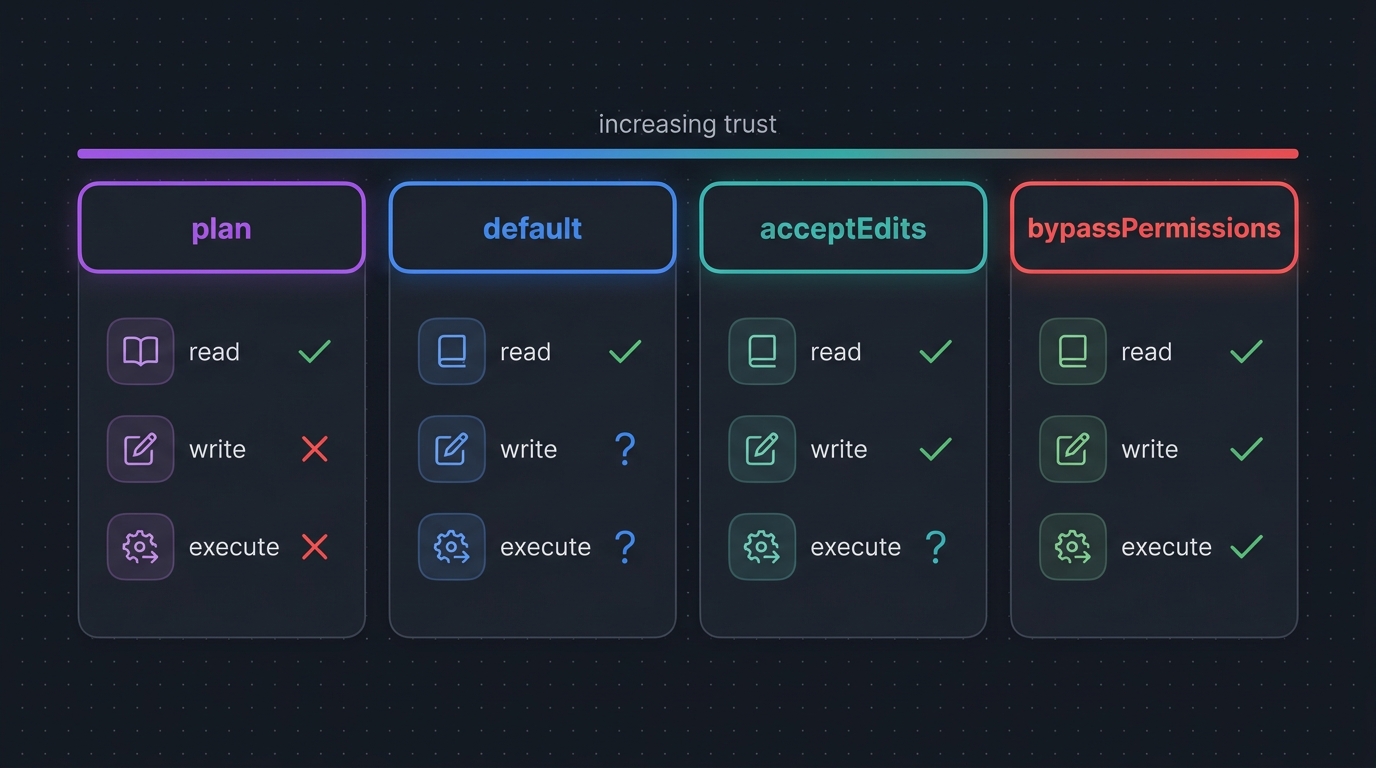 The four permission modes and what each one auto-approves.
There are two extra modes — dontAsk and bypassPermissions — that don’t appear in the cycle. dontAsk is what you want for headless CI runs: only pre-approved tools fire, everything else is auto-denied. bypassPermissions is what --dangerously-skip-permissions activates, and it’s the mode you should actively prevent via disableBypassPermissionsMode: "disable" unless you’re inside a hardened sandbox.
Permission rule grammar
The allow / ask / deny arrays each take patterns matched against tool invocations:
Bash(npm run *)            # tool + specifier prefix (with limitations — see below)
Read(./.env)               # exact file path
Read(./secrets/**)         # glob
Edit(./src/**/*.ts)        # type-scoped edits
WebFetch(domain:github.com)
mcp__context7__*           # all tools from one MCP server
MCP(server:tool)           # specific MCP tool
Skill(name)                # specific skill
Skill(name *)              # any skill matching prefix
Skill                      # ALL skills (use with deny)
Agent(reviewer)            # specific subagent
Evaluation order: deny wins → ask next → allow last. First match wins within a layer; arrays merge across layers. Read-only commands (ls, cat, pwd, grep, whoami, date, echo) are pre-approved in every mode.
A subtle gotcha: Bash(npm run *) is a prefix match, but Claude composes Bash commands. A chained command like npm run lint && rm -rf node_modules may bypass naive prefix matchers. The defence-in-depth answer is to combine permission rules with sandboxing and a PreToolUse Bash hook that scans the full command (the danger-blocker.sh script later in this post does exactly that).
additionalDirectories and disableBypassPermissionsMode
Two settings that show up in real configs but are rarely explained:
additionalDirectories— extra paths Claude is allowed to read/edit beyond the cwd, without needing per-prompt approval. Useful when your project sits in a monorepo and you regularly read../shared-typesor../docs.disableBypassPermissionsMode: "disable"— soft-blocks--dangerously-skip-permissions. Set this in your user~/.claude/settings.jsonand you can’t accidentally start a session with bypass on. Set it in managed settings and your team can’t either.
Auto Mode and the classifier
Auto Mode (Boris’s April 16 2026 thread, Opus 4.7+) is a separate small model that intercepts every permission decision and routes it to one of three outcomes: auto-approve, ask the user, or auto-deny. It’s available on Max, Teams, and Enterprise plans.
Two important properties:
- It’s transcript-aware. If you tell Claude in chat “don’t push to main,” the classifier reads that boundary on every check. But — and this matters — it re-reads from the current transcript, so compaction can drop the rule. For boundaries you must enforce, add an explicit
denyrule. Don’t trust prompts. - It falls back. Auto Mode reverts to standard prompting after 3 consecutive blocks or 20 total in a session. Headless
-paborts after repeated blocks. This is by design — if the classifier is repeatedly disagreeing with what Claude wants to do, you should be in the loop.
You can dump and customise the classifier rules:
claude auto-mode defaults > my-rules.json
# Edit, then:
{
"autoMode": {
"allow": ["$defaults", "Bash(npm test:*)"],
"soft_deny": ["$defaults", "Bash(rm:*)"],
"environment": "development"
}
}The $defaults token (v2.1.118+) extends the baseline rather than replacing it.
/fewer-permission-prompts — the skill that pays for itself
Boris’s #1 tip from his April thread is to run the Anthropic-shipped /fewer-permission-prompts skill once after a few sessions. It scans your approval history and outputs a paste-ready permissions.allow array you can drop into settings.json. Stop hand-curating allowlists — let Claude do it. Pair this with Auto Mode and you’ll rarely see a permission prompt again, without ever touching --dangerously-skip-permissions.
Why never --dangerously-skip-permissions
Boris’s quote, multiple threads, paraphrased verbatim: “NEVER --dangerously-skip-permissions.” The reason is structural — that flag disables the entire permission layer, which means it also disables the classifier, the Bash blocklist, and the deny rules you’ve spent weeks tuning. The only acceptable use is in a fully isolated container or VM where you treat the entire environment as ephemeral.
If you find yourself reaching for the flag, the right answer is almost always:
- Run
/fewer-permission-promptsto grow yourallowlist. - Switch to
acceptEditsmode for iteration. - Switch to
automode for long unattended runs (with the classifier on). - Use
dontAskmode + an explicitallowlist for CI.
Plan Mode Mechanics
Plan mode gets undersold because the docs treat it as a feature; in practice it’s a workflow.
How to enter
Three ways:
# 1. Cycle from inside a session
Shift+Tab Shift+Tab

# 2. Start in plan mode
claude --permission-mode plan

# 3. One-shot plan
claude --permission-mode plan -p "Analyze the auth system and propose improvements"
Inside plan mode, Claude is read-only and uses the AskUserQuestion tool to gather requirements. No edits, no writes, no destructive bash. Press Ctrl+G (or Cmd+G on macOS) to open the plan in $EDITOR for direct surgery before accepting. When you accept the plan, the session is auto-named for --resume discoverability.
The four-phase loop
This is the workflow Boris and the Anthropic best-practices doc both endorse:
1. Explore (Plan Mode):     Read code. Build context. Don't change.
2. Plan (Plan Mode):        "Output a numbered plan with verify steps."
3. Implement (acceptEdits): Shift+Tab once. Claude executes. You watch.
4. Verify (Stop hook):      Tests run. /go invokes verifier. Or press Ctrl+G to review.
Boris’s exact words: “Pour energy into the plan. A good plan is really important. Then auto-accept edits and Claude usually 1-shots it.”
opusplan internals
The opusplan model alias does the right thing automatically:
- During plan mode, it routes to Opus (highest-capability planning).
- During execution, it routes to Sonnet (faster, cheaper, equally good at coding).
- It always uses 200K context — no auto-1M upgrade, even on Max plans, because plan-mode work is rarely token-heavy.
This is the single best default for most people. Set it in settings.json and forget the model picker exists.
The two-Claude review
The team’s twist that elevates plan mode: two-Claude review. Claude #1 writes the plan in plan mode. Claude #2 (a fresh session, ideally a worktree) reviews it as a staff engineer. Iterate until clean. Then implement. The cost of a 30-second plan critique is nothing compared to a 30-minute wrong implementation, and the iteration loop is the fastest path to plans that survive contact with reality.
A reusable plan-critique skill is the back half of /rev-engine later in this post.
Team-shared plan templates
If your team writes plans for every PR, share the template via .claude/commands/plan.md:
---
description: Generate a numbered plan for the requested change
argument-hint: <task description>
---

You are in PLAN MODE. Do not edit files.

For "$ARGUMENTS", produce:

## Goal
One-sentence outcome.

## Files to touch
- `path/to/file` — what changes, why

## Steps (each with verify check)
1. [Action] — Verify: [test/script/screenshot to run]

## Open questions
- [Anything that requires the user's call before implementing]

## Done when
- [Concrete success criteria]

STOP. Wait for "approved" before exiting plan mode.
/plan implement google oauth now produces a structured artefact that two Claudes (or two humans) can review against. Default defaultMode: "plan" in .claude/settings.json if your team wants every fresh session to start in plan mode.
CLAUDE.md Done Right
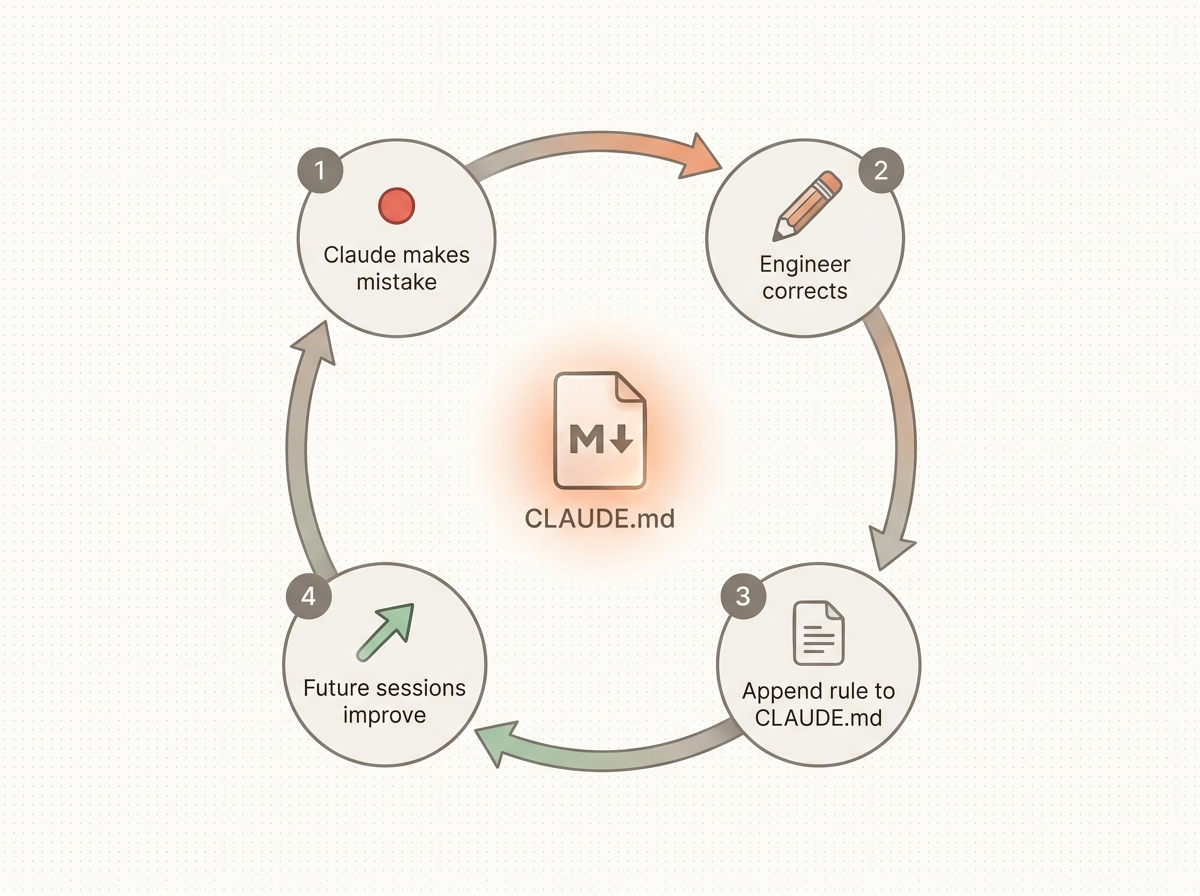 The compound learning loop. Every correction makes Claude smarter on every future session.
CLAUDE.md is the single most impactful file in any repo using Claude Code. It loads every session, on every prompt. Bloated CLAUDE.md = ignored CLAUDE.md. Sharp CLAUDE.md = compound learning. The hard cap: 200 lines. That is the most-cited rule in shanraisshan/claude-code-best-practice (48K stars), and it matches widely reported experience — past 200 lines, adherence drops off a cliff because the file stops fitting the model’s effective scan window.
Block-level HTML comments <!-- ... --> are stripped before injection — useful for human-only notes you don’t want eating tokens.
Pattern 1: The Karpathy 65-line file
This is the viral one. It went from zero to 5,800 stars in a single day in April 2026 (forrestchang/andrej-karpathy-skills, 86K stars on the parent repo). Use it as your starting template for any greenfield repo.
# CLAUDE.md
Behavioral guidelines to reduce common LLM coding mistakes.

## 1. Think Before Coding
- State assumptions explicitly. If uncertain, ASK.
- If multiple interpretations exist, present them — don't pick silently.
- If a simpler approach exists, say so. Push back when warranted.

## 2. Simplicity First
- No features beyond what was asked.
- No abstractions for single-use code.
- No "flexibility" or "configurability" not requested.
- If you write 200 lines and it could be 50, rewrite it.
- Senior-engineer test: "Is this overcomplicated?" If yes, simplify.

## 3. Surgical Changes
- Touch only what you must. Match existing style.
- Don't refactor things that aren't broken.
- Remove imports/variables YOUR changes orphaned. Don't delete pre-existing dead code.
- Test: every changed line traces to the user's request.

## 4. Goal-Driven Execution
- Define success criteria. Loop until verified.
  - "Add validation" → "Write tests for invalid inputs, then make them pass"
  - "Fix the bug"   → "Write a test that reproduces it, then make it pass"
- For multi-step tasks state a brief plan: each step + verify check.

## 5. Project-Specific
- Package manager: pnpm (NOT npm/yarn).
- Test runner: vitest. Run single tests with `pnpm test path/to/file.test.ts`.
- Lint/typecheck after every series of edits: `pnpm lint && pnpm typecheck`.
- Commit format: `feat(scope): subject`. One commit per logical change.
Each rule names a specific failure mode. No fluff, no “be helpful.” That’s why it works.
Pattern 2: The shanraisshan skeleton
Boris’s own preferred shape for committed CLAUDE.md files comes out of shanraisshan/claude-code-best-practice. It explicitly encodes the precedence chain, which is gold for new team members:
# CLAUDE.md

## Repository Overview
[1-2 sentences on what the repo IS — not what it does, who it's for]

## Key Components
### <Major subsystem>
- `<file>`: <one-line role>

## Critical Patterns
### Subagent Orchestration
Subagents CANNOT invoke other subagents via bash. Use the Agent tool:
`Agent(subagent_type="agent-name", description="...", prompt="...", model="haiku")`

### Configuration Hierarchy
1. managed-settings.json (org)  2. CLI args  3. settings.local.json
4. settings.json  5. ~/.claude/settings.json  6. hook overrides

## Workflow Best Practices
- Keep CLAUDE.md under 200 lines per file for reliable adherence
- `.claude/rules/*.md` with `paths:` frontmatter are LAZY-LOADED only when
  Claude touches matching files; without frontmatter they load every session
- Use commands for workflows, not standalone agents
- Create feature-specific subagents WITH skills (progressive disclosure),
  not general-purpose agents
- Manual `/compact` at ~50% context usage
- Plan mode for complex tasks
- Break subtasks small enough to complete under 50% context

## Git Commit Rules
- Separate commits per file
- File-specific messages
Pattern 3: The wshobson marketplace skeleton
wshobson/agents (34K stars) treats CLAUDE.md as a contract for plugin authors. The model-tier table is worth stealing whole:
# Project: <name>
<one-line summary with concrete numbers>

## Repository Structure
[tree, 5–10 lines max]

## Plugin Authoring Conventions
### Agent frontmatter
- name: kebab-case
- description: "Use PROACTIVELY when [trigger conditions]."
- model: opus | sonnet | haiku | inherit
- tools: Read, Grep, Glob   (optional — restricts available tools)
- color: blue | green | red | yellow | cyan | magenta

## Model Tiers
| Tier | Model | Use Case |
| 1 | Opus    | Architecture, security, code review, production coding |
| 2 | Inherit | Complex tasks — user picks |
| 3 | Sonnet  | Docs, testing, debugging |
| 4 | Haiku   | Fast ops, SEO, deployment, simple tasks |
Pattern 4: The Jarrod Watts XML / Phase 0 Intent Gate
jarrodwatts/claude-code-config (1K stars) takes a different approach — XML-style tags and phased instructions. Heavier than Karpathy, but the Phase 0 Intent Gate is the sharpest published idea for stopping Claude from implementing things it was not asked to.
<Role>
Your code should be indistinguishable from a senior staff engineer's.

**Identity**: SF Bay Area engineer. Work, delegate, verify, ship. No AI slop.

**Core Competencies**:
- Parsing implicit requirements from explicit requests
- Adapting to codebase maturity (disciplined vs chaotic)
- Delegating specialized work to the right subagents
- Follows user instructions. NEVER START IMPLEMENTING UNLESS USER WANTS YOU TO.
</Role>

<Philosophy>
This codebase will outlive you. Every shortcut becomes someone else's burden.
Fight entropy. Leave the codebase better than you found it.
</Philosophy>

<Behavior_Instructions>
## Phase 0 - Intent Gate (EVERY message)
### Key Triggers (check BEFORE classification):
- External library/source mentioned → fire `librarian` subagent in background
- 2+ modules involved → fire `code-explorer` subagent in background
- GitHub @-mention in issue/PR → WORK REQUEST. Plan: investigate → implement → create PR
- "What do you think?" / "Should I?" → DISCUSSION, do not implement
- Vague request without acceptance criteria → ASK before doing anything

### Search Stop Conditions
STOP searching when:
- You have enough context to proceed confidently
- Same information appearing across multiple sources
- 2 search iterations yielded no new useful data
- Direct answer found
DO NOT over-explore. Time is precious.
</Behavior_Instructions>
The Phase 0 Intent Gate fixes the “Claude implements before clarifying” failure mode. The Search Stop Conditions fix the “Claude greps the entire codebase for an obvious one-line change” failure mode. Steal both.
Memory imports + auto-memory
Two features turn CLAUDE.md from a file into a system: imports and auto-memory.
Imports. Inside CLAUDE.md, you can pull in other markdown files using the @path/to/file.md syntax. Recursive up to depth 5. First time, Claude shows an approval dialog so you know what’s loading. The killer pattern is splitting big context across imports:
# CLAUDE.md (root, < 30 lines)

For active blockers and current task context, read first:
@./notes/active.md

For architectural decisions:
@./notes/decisions.md

For team conventions:
@./.claude/rules/conventions.md

For agent-specific rules (only loads when called from Claude.ai/agents.md):
@AGENTS.md
@AGENTS.md is the recommended way to interoperate with other coding tools that read AGENTS.md instead of CLAUDE.md — Claude Code itself only reads CLAUDE.md, but importing the file means you maintain one source of truth.
Auto-memory. Since v2.1.59, Claude Code maintains its own memory at ~/.claude/projects/<project>/memory/:
MEMORY.md           # concise index — first 200 lines / 25KB load every session
debugging.md        # detailed, on-demand
api-conventions.md
deployment.md
...
When you tell Claude “always use pnpm, not npm” it lands here automatically. Auto-memory is machine-local (not synced across machines) but shared across worktrees of the same git repo. Disable via autoMemoryEnabled: false or CLAUDE_CODE_DISABLE_AUTO_MEMORY=1. Inspect and toggle live with /memory. The autoMemoryDirectory setting can relocate it (but only in user/managed settings — project settings can’t redirect, to prevent shared repos from messing with personal storage).
Subagents can have their own auto-memory via memory: user|project|local frontmatter. A code-reviewer agent with memory: project learns your team’s review preferences over time, which is unreasonably useful.
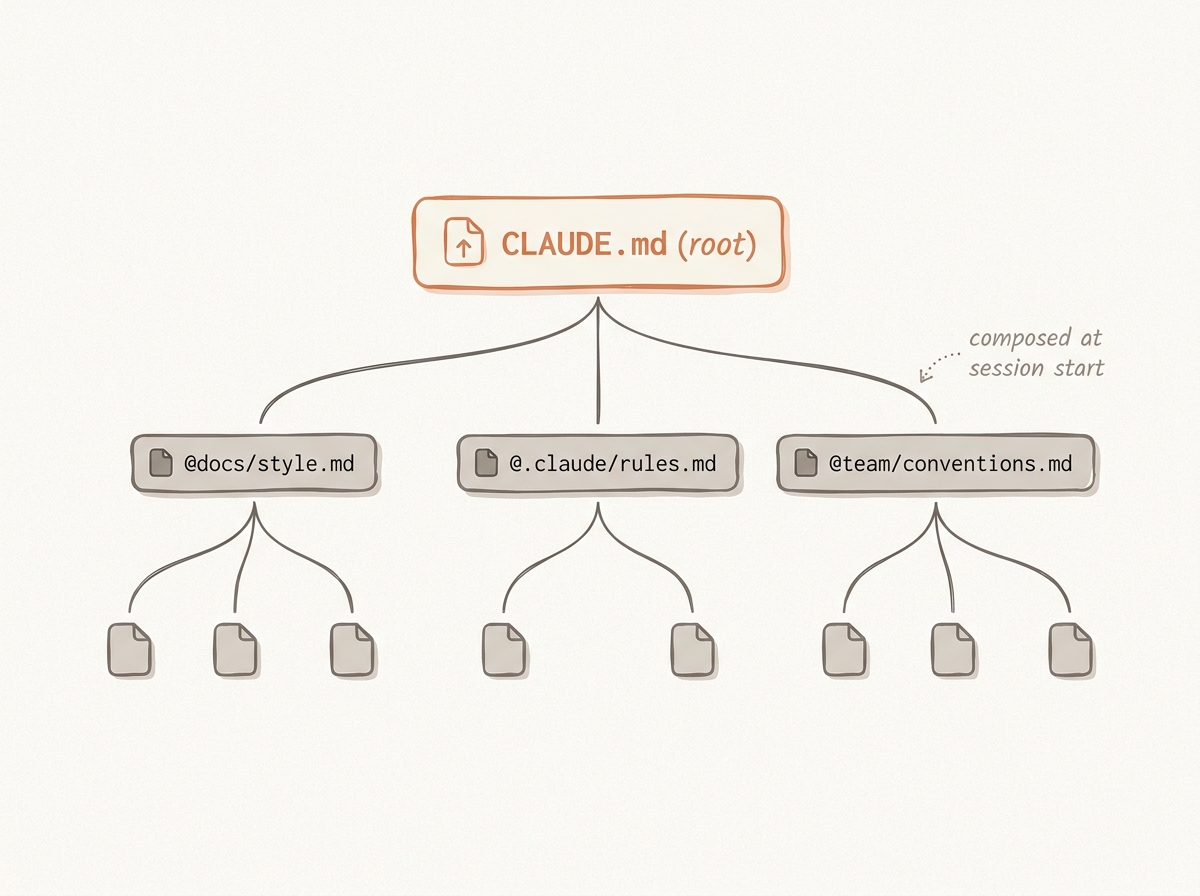 How @-imports compose your CLAUDE.md from a tree of smaller files.
The compounding pattern (steal this immediately)
After every correction Claude makes, end your message with this exact phrase:
“Update your CLAUDE.md so you don’t make that mistake again.”
Boris’s team’s words: “Claude is eerily good at writing rules for itself.” Run this for two weeks and your mistake rate measurably drops. This single behavior is the entire premise behind Dan Shipper’s “Compounding Engineering” — the idea that every bug fix should leave a permanent rule behind, so the same bug never costs you twice. Boris’s team operationalises it further: tag @claude in PR review comments, and the Claude Code GitHub Action (/install-github-action) appends the rule to CLAUDE.md as part of the merge.
The corollary, from Anthropic’s own engineering team: “If Claude does X correctly without the rule, delete the rule.” Treat CLAUDE.md like a garden, not a vault.
The three-level hierarchy and the notes-directory pattern
~/.claude/CLAUDE.md       ← global personal preferences (every project)
{project}/CLAUDE.md       ← project rules (committed, team-shared)
{project}/CLAUDE.local.md ← personal overrides (gitignored)
This is abhishekray07/claude-md-templates’s structure. Personal preferences (name, style, “always use TypeScript strict mode”) go in the home file. Team rules go in the committed file. Personal overrides (“at this client we use yarn, even when pnpm is the personal default”) go in the gitignored local file. Do not mash them together.
The companion pattern, from the Boris team: the notes directory. One engineer maintains a notes/ directory updated after every PR — notes/active.md for current blockers, notes/decisions.md for ADRs, notes/learnings.md for “things we tried that didn’t work.” Then CLAUDE.md points at it via imports, keeping the root file under 50 lines while still feeding Claude a rich, evolving context.
Subagents That Pay Rent
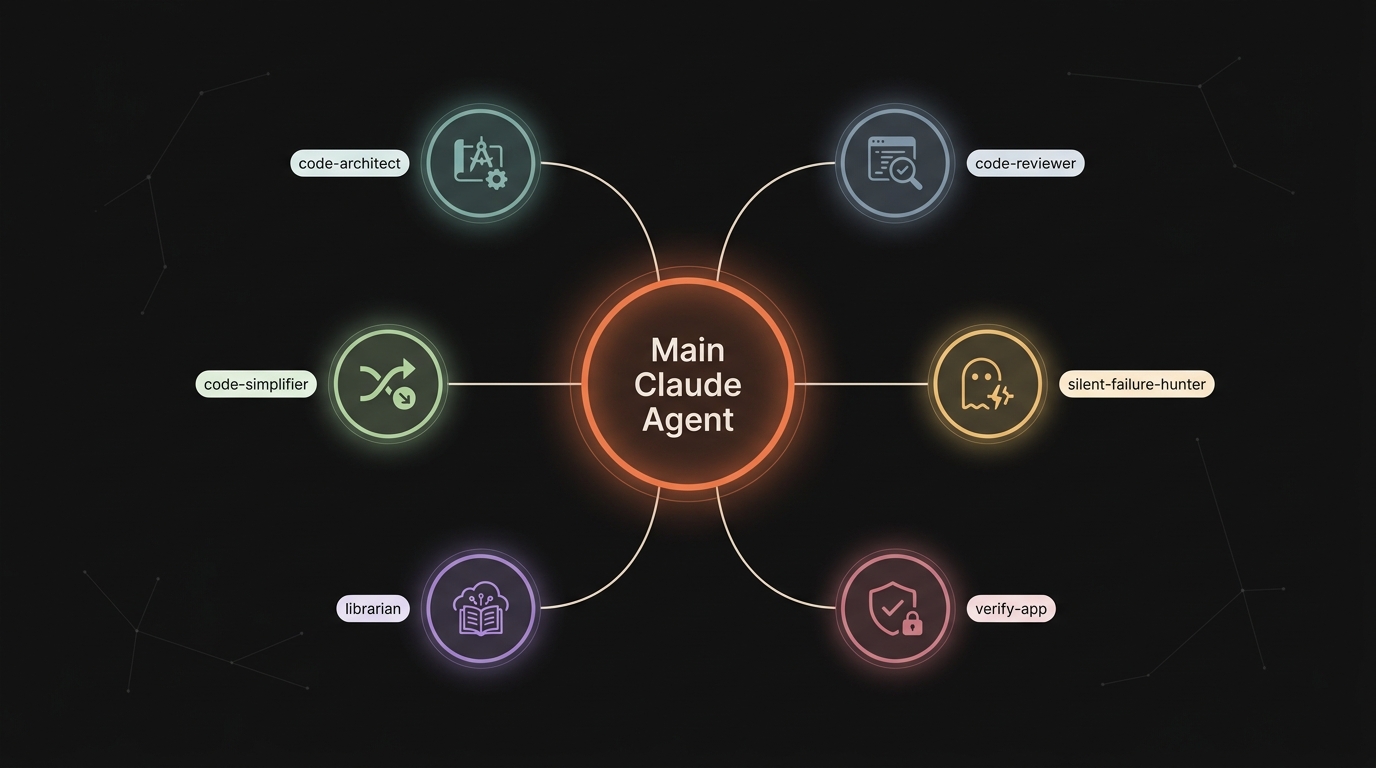 Main Claude delegates to specialist subagents. Each one keeps its work out of your main context window.
Subagents are markdown files at .claude/agents/<name>.md with YAML frontmatter. Each invocation runs in fresh context and returns only its summary to your main conversation. Use them to isolate verbose work (test runs, log scanning, parallel research) and to specialise behaviour without bloating CLAUDE.md.
Why this matters: every agent’s frontmatter description loads into context every session. Five well-tuned agents beat fifty random ones. Pick a small starter set, prove they earn their keep, add more only when you hit a real gap.
The full frontmatter spec
Across every top repo (wshobson, VoltAgent, vijaythecoder, anthropics), the schema settled to this:
---
name: code-reviewer            # required, lowercase + hyphens
description: Reviews code for quality and security. Use proactively after edits.
tools: Read, Glob, Grep, Bash  # optional allowlist; omit = inherit all
disallowedTools: Edit, Write   # optional removal from inherited
model: sonnet                  # sonnet | opus | haiku | <full-id> | inherit
permissionMode: plan           # default | acceptEdits | auto | dontAsk | bypassPermissions | plan
maxTurns: 30                   # cap loops
skills: [code-style, api-conventions]   # FULL skill bodies preloaded
mcpServers: [slack, github]    # restrict MCP access
hooks:                          # lifecycle hooks scoped to this agent
  PostToolUse: [...]
memory: project                 # user | project | local — enables persistent learning
background: true                # run concurrently
effort: high
isolation: worktree             # spawn temp git worktree, auto-cleanup if no changes
color: cyan
initialPrompt: "Run a security pass on the diff first."
---

You are a senior code reviewer. Focus on:
- Injection vulnerabilities
- Authentication and authorization flaws
- Secrets in code
- Insecure data handling

Provide specific line references and suggested fixes.
The body becomes the subagent’s system prompt — replacing Claude Code’s default system prompt entirely (so the agent can have a wholly different role).
The five subagents worth keeping across every project
1. code-architect — designs blueprints before implementation. From Anthropic’s feature-dev plugin.
---
name: code-architect
description: Designs feature architectures by analyzing existing codebase patterns and conventions, then providing comprehensive implementation blueprints with specific files to create/modify, component designs, data flows, and build sequences
tools: Glob, Grep, LS, Read, NotebookRead, WebFetch, TodoWrite, WebSearch
model: sonnet
color: green
---

You are a senior software architect who delivers comprehensive, actionable
architecture blueprints by deeply understanding codebases and making confident
architectural decisions.

## Core Process
**1. Codebase Pattern Analysis** — extract patterns, stack, abstraction layers,
   CLAUDE.md guidelines. Find similar features.
**2. Architecture Design** — make decisive choices, pick one approach and commit.
**3. Complete Implementation Blueprint** — specify every file to create/modify,
   components, integration points, data flow. Phase the work into clear steps.

## Output Guidance
Deliver a decisive blueprint:
- Patterns & Conventions Found (with file:line refs)
- Architecture Decision (with rationale & trade-offs)
- Component Design (file path, responsibilities, deps, interfaces)
- Implementation Map (specific files + change descriptions)
- Data Flow (entry points → transformations → outputs)
- Build Sequence (phased checklist)
- Critical Details (errors, state, testing, perf, security)

Make confident choices. Be specific & actionable.
2. code-reviewer — auto-invokes after edits, catches the 90% of issues humans miss. From Anthropic’s pr-review-toolkit.
---
name: code-reviewer
description: Use PROACTIVELY after writing or modifying code. Reviews for quality, security, maintainability. Provides specific line references and suggested fixes.
tools: Read, Glob, Grep, Bash
model: sonnet
---

You are a senior code reviewer. Review only what changed (diff-only).
Focus on:
- Logic bugs that produce wrong output regardless of inputs
- Injection vulnerabilities, auth flaws, secrets
- CLAUDE.md violations (quote the rule)
- Silent failures (catch blocks that swallow errors)

DO NOT flag style/lint issues, subjective improvements, or pre-existing problems.

For every issue: file:line + rationale + suggested fix.
3. code-simplifier — Boris’s daily driver. From wshobson/agents (34K stars).
---
name: code-simplifier
description: Use PROACTIVELY after a feature is complete. Removes redundancy, dead code, over-abstractions; collapses near-duplicate functions; simplifies control flow without changing behavior.
tools: Read, Edit, MultiEdit, Glob, Grep, Bash
model: sonnet
---

You simplify working code without changing behavior. Apply ruthlessly:
1. Inline single-call helpers
2. Collapse 2+ near-duplicate functions into 1 with a parameter
3. Remove dead code, unused imports, "just in case" branches
4. Reduce nesting (early returns, guard clauses)
5. Replace cleverness with clarity

NEVER change observable behavior. Run tests after every change.
If a test breaks, revert the change.
4. silent-failure-hunter — catches the bugs you’d otherwise ship. From the pr-review-toolkit. Note the Anthropic <example> + <commentary> pattern that materially raises auto-invocation reliability.
---
name: silent-failure-hunter
description: Use this agent when reviewing code changes that involve error handling, catch blocks, fallback logic, or any code that could potentially suppress errors.

<example>
Context: A teammate just finished implementing a new feature that fetches data from an API with fallback behavior.
user: "I added a fallback to the API fetcher."
assistant: "I'll use the silent-failure-hunter agent to audit the new error handling."
<commentary>
Fallback logic + new try/catch → invoke silent-failure-hunter automatically.
</commentary>
</example>
model: inherit
color: yellow
---

## Core Principles
1. Silent failures are unacceptable
2. Users deserve actionable feedback
3. Fallbacks must be explicit AND justified
4. Catch blocks must be specific (no broad excepts)
5. Mock/fake implementations belong only in tests
5. librarian — fetches up-to-date docs without burning a turn on web search. Jarrod Watts’s pattern.
---
name: librarian
description: Use PROACTIVELY when an external library, framework, or API is mentioned. Fetches up-to-date docs (via Context7 MCP or WebFetch) and returns a 1-page summary with links to the relevant sections.
tools: Read, WebFetch, WebSearch, mcp__context7__*
model: haiku
---

You are the team's reference librarian. When invoked:
1. Identify the library/framework + the specific question
2. Use Context7 MCP if available; else WebFetch official docs
3. Return: 1-paragraph summary, code example, link to deepest doc page
4. Stop. Don't implement, don't speculate.
6. verify-app — Boris’s end-to-end tester, the back half of the /go skill below.
---
name: verify-app
description: Use PROACTIVELY before marking work complete. Runs the project's full verification: tests, build, smoke checks via Playwright/curl. Returns PASS or specific failures. Never modifies code.
tools: Read, Bash, mcp__playwright__*
model: sonnet
---

You verify, you don't fix. When invoked:
1. Read CLAUDE.md / package.json for the verify command
2. Run: lint → typecheck → unit tests → build → smoke test
3. If frontend: launch Playwright, hit the changed pages, check console errors
4. If backend: hit /health and the changed endpoints
5. Return: PASS or list each failure with file:line + the exact failing assertion
Six more for situational depth
The five-agent set covers most projects. The next six show up frequently in wshobson, VoltAgent, and vijaythecoder and are worth keeping nearby.
code-explorer (Anthropic feature-dev) — scans 2+ modules in parallel, returns a curated file list before the architect runs.
api-designer (VoltAgent role pattern) — the canonical “When invoked: 1…2…3 + checklist” template. 100+ subagents in VoltAgent/awesome-claude-code-subagents use this exact shape:
---
name: api-designer
description: "Use this agent when designing new APIs, creating API specifications, or refactoring existing API architecture. Invoke when you need REST/GraphQL endpoint design, OpenAPI documentation, authentication patterns, or API versioning strategies."
tools: Read, Write, Edit, Bash, Glob, Grep
model: sonnet
---

You are a senior API designer.

When invoked:
1. Query context manager for existing API patterns and conventions
2. Review business domain models and relationships
3. Analyze client requirements and use cases
4. Design following API-first principles and standards

API design checklist:
- RESTful principles properly applied
- OpenAPI 3.1 specification complete
- Consistent naming conventions
- Comprehensive error responses
- Pagination implemented correctly
- Rate limiting configured
- Authentication patterns defined
- Backward compatibility ensured
team-lead (wshobson opus) — the orchestrator. Decomposes work into parallel tasks with file ownership boundaries, manages the team lifecycle, synthesises results.
---
name: team-lead
description: Team orchestrator that decomposes work into parallel tasks with file ownership boundaries, manages team lifecycle, and synthesizes results.
tools: Read, Glob, Grep, Bash
model: opus
color: blue
---

## File Ownership Rules
1. ONE OWNER PER FILE — never assign the same file to multiple teammates
2. Explicit boundaries — list owned files in each task
3. Interface contracts — when teammates share boundaries, define types/APIs first
4. Shared files — lead owns them and applies changes sequentially

## Team Lifecycle Protocol
1. Spawn   — TeamCreate + Agent
2. Assign  — TaskCreate + TaskUpdate
3. Monitor — TaskList polling
4. Collect — gather results
5. Synthesize — merge with attribution
6. Shutdown — shutdown_request to each teammate
7. Cleanup — TeamDelete

## Behavioral Traits
- Decomposes BEFORE delegating — never vague tasks
- Bias toward smaller teams with clearer ownership
tech-lead-orchestrator (vijaythecoder, 4K stars) — strict-format orchestrator, the Markdown-template-as-protocol pattern. The lesson: rigid section names and named output blocks beat free-form prompts for orchestration reliability.
---
name: tech-lead-orchestrator
description: Senior technical lead — analyzes complex projects and coordinates multi-step development. NEVER write code, only delegate.
tools: Read, Grep, Glob, LS, Bash
model: opus
---

## CRITICAL RULES
1. Main agent NEVER implements — only delegates
2. Maximum 2 agents run in parallel
3. Use MANDATORY FORMAT exactly
4. Find agents from system context
5. Use exact agent names only

## MANDATORY RESPONSE FORMAT
### Task Analysis
- [Project summary - 2-3 bullets]
- [Tech stack detected]

### SubAgent Assignments
Task 1: [description] → AGENT: @agent-[exact-agent-name]
Task 2: [description] → AGENT: @agent-[exact-agent-name]

### Execution Order
- Parallel: Tasks [X, Y] (max 2)
- Sequential: A → B → C

### Instructions to Main Agent
- Delegate task 1 to [agent]
- After 1, run 2+3 in parallel
Permission classifier subagent (Boris team tip #8) — a Haiku/Opus subagent that runs from a PreToolUse hook, scans the proposed command for attack patterns, and emits an allow / deny / ask decision. Wires up like this:
---
name: permission-classifier
description: Classifies tool calls as safe, risky, or dangerous. Used internally by PreToolUse hooks. Returns one-word verdict.
tools: []
model: opus
effort: low
---

You classify a single tool call. Return exactly one of: ALLOW | ASK | DENY.

ALLOW when: read-only, idempotent, scoped to project dir, no exfil pattern.
ASK when: writes outside project, network calls, package install, git push.
DENY when: rm -rf in critical paths, sudo, secret-file writes, fork bombs,
           pipe-to-shell from network.

Return only the verdict. No explanation.
code-explorer + code-architect + code-reviewer together — the Anthropic feature-dev flagship pattern. Explorer surfaces the relevant files, architect produces the blueprint, reviewer audits the result. The /feature-dev command later in this post chains all three with TodoWrite between phases.
Three escalation levels for invocation
- Natural language: “Use the code-reviewer subagent to look at my changes.” Claude decides.
- @-mention:
@"code-reviewer (agent)" review the auth changes— guarantees that agent runs, exactly once. - Whole-session:
claude --agent code-revieweror"agent": "code-reviewer"in settings — entire main thread runs as that agent.
The magic phrase: append "use subagents" to any prompt to throw more compute at the problem. Boris’s tip #8, and it works exactly the way it sounds — Claude will fan out to specialists rather than chewing through everything in the main context.
Foreground vs background, and the gotchas
- Foreground blocks; permission prompts pass through to you.
- Background: Claude pre-prompts you for all permissions the agent will need, then auto-denies anything else.
Ctrl+Bbackgrounds a running task. Failed background → retry as foreground.
Subagents cannot spawn other subagents via bash — that path is closed for security. Use chained subagents from main, or use skills (which can compose). Plugin-distributed subagents ignore hooks, mcpServers, and permissionMode in their frontmatter for the same reason.
Subagent transcripts persist at ~/.claude/projects/{project}/{sessionId}/subagents/agent-{agentId}.jsonl. Resume a stopped subagent by asking Claude “continue that review” — it auto-resumes from the last state.
Model-tier strategy
This is the universal map across wshobson, VoltAgent, and Anthropic’s own plugins:
| Tier | Model | Use cases |
|---|---|---|
| 1 | Opus | Architecture, security, code review, orchestration, production coding |
| 2 | inherit | Complex tasks where the user pre-filters |
| 3 | Sonnet | Docs, testing, debugging, support |
| 4 | Haiku | Fast ops (PR triage, simple commits, classification, routing) |
Boris’s permission classifier runs Haiku-by-default but switches to Opus when high-stakes (his exact tip: route permission requests to Opus 4.5 via a hook so it can scan for prompt-injection attacks).
Skills: The Killer Feature Most People Miss
Skills are markdown files at .claude/skills/<name>/SKILL.md that auto-invoke based on description trigger phrases. They follow the open Agent Skills standard. Custom commands (.claude/commands/*.md) have been merged into skills — both produce /name — but skills support progressive disclosure, supporting files (references/, assets/, scripts/), and reuse across plugins.
Decision matrix, in plain English:
| Need | Use |
|---|---|
| Always-on rules + project facts | CLAUDE.md |
Path-scoped rules (only for src/api/**) | .claude/rules/*.md with paths: frontmatter |
| Reusable workflow user OR Claude can invoke | Skill |
| Reference knowledge Claude pulls in when relevant | Skill (default frontmatter) |
| Domain expertise with own context + tools | Subagent |
| Voice/tone/persona change | Output style |
| Guarantee an action runs | Hook |
| Quick one-off question that should not pollute context | /btw |
| External tool with realtime push | MCP server with channels |
| External tool with simple API | CLI (gh, aws) — more context-efficient than MCP |
The three skills worth installing on every project
/fewer-permission-prompts (Anthropic-shipped)
Boris’s #1 tip from his April 2026 thread. Run it once after a few sessions. It scans your approval history and outputs a paste-ready permissions.allow array. Stop hand-curating allowlists.
/go — the Boris pipeline
---
name: go
description: After implementation, ship it end-to-end. Tests itself (bash, browser, computer use), runs /simplify, then opens a PR. Use when work feels complete and you want to verify-and-ship in one shot.
allowed-tools: Bash Read Edit mcp__playwright__* Bash(gh pr create:*)
---

# /go — Verify, Simplify, Ship

## Phase 1: Verify
- Run lint, typecheck, full test suite
- If frontend: Playwright smoke test of changed pages, capture console errors
- If backend: hit /health and changed endpoints, verify expected payloads
- If ANY failure, STOP and report. Do NOT proceed to simplify.

## Phase 2: Simplify
- Invoke @code-simplifier on the diff only
- Re-run tests. If anything breaks, revert the simplification.

## Phase 3: Ship
- `git add -p` (or stage all if appropriate)
- Commit with conventional format: `feat(scope): subject`
- Push branch
- `gh pr create` with summary bullets + test plan + screenshots/log snippets

Output: PR URL or specific failure with file:line.
This single skill does more work than any other piece of the setup. Boris claims 2-3x quality on the final PR. That estimate is conservative.
/sync — weekly context dump
---
name: sync
description: Pull last 7 days of Slack threads, GDrive docs, Asana tasks, and GitHub PRs/issues into a single context dump. Use at the start of a planning session or after vacation.
allowed-tools: mcp__slack__* mcp__github__* WebFetch
---

1. Slack: search workspace for "$ARG" or assigned messages from last 7d
2. GitHub: PRs touched / reviewed / mentioned in last 7d
3. Asana: tasks I own with last_modified within 7d
4. Output: dated bullets grouped by source. No commentary.
Use it Monday morning. Use it after vacation. Use it before any planning session.
Skills Deep Dive
The published skill standard has more knobs than most users touch. Here’s the complete frontmatter, what each field does, and when to reach for it.
The full SKILL.md frontmatter spec
---
name: deploy                        # optional; defaults to dir name; lowercase + hyphens
description: Deploys app to prod. Use when user asks to "ship it", "deploy to prod", "release".
license: MIT                        # optional, free-form
version: 0.1.0                      # optional
compatibility: ">=2.1.110"          # optional, 1-500 chars; semver constraint
metadata: { author: "team-x" }      # optional, free-form
when_to_use: "Trigger phrases: 'ship it', 'deploy to prod'"
disable-model-invocation: true      # only USER can invoke (no auto-trigger)
user-invocable: false               # only CLAUDE can invoke (background knowledge)
allowed-tools: Bash(git *) Read     # space-separated, pre-approved when skill is active
argument-hint: "[env] [version]"
arguments: [env, version]           # named positional → $env, $version
model: opus                         # override for skill turn (resets after)
effort: max                         # override session effort
context: fork                       # run in subagent — body becomes the task
agent: Explore                      # which agent type for context: fork
hooks: { PreToolUse: [...] }
paths: ["src/api/**/*.ts"]          # only auto-load when matching files in scope
shell: bash                         # or powershell (needs CLAUDE_CODE_USE_POWERSHELL_TOOL=1)
---

Your skill body. Reference $ARGUMENTS, $0, $1, $env, $version,
${CLAUDE_SESSION_ID}, ${CLAUDE_SKILL_DIR}.

Inline shell injection (preprocessed before Claude sees it):
- PR diff: !`gh pr diff`
- Multi-line:
```!
node --version
git status --short
```

Reference supporting files: see [reference.md](reference.md), [scripts/run.sh](scripts/run.sh).
The three loading levels (progressive disclosure)
This is the cleverest part of the skill design.
- Metadata (name + description, capped 1,536 chars combined with
when_to_use) — always in context so Claude knows the skill exists. This is where trigger phrases live. - SKILL.md body — loaded only when the skill is invoked (by user
/skillor by Claude). Stays for the rest of the session. - Supporting files (
references/*.md,scripts/*.py,assets/*) — Claude loads them on-demand via Read or Bash, not eagerly.
So a 5,000-line domain reference can sit on disk costing zero tokens until needed. Then a 200-line SKILL.md summarises and points at the deep parts. That’s progressive disclosure in action.
The recommended layout, from Anthropic’s own skill-development skill:
skills/<skill-name>/
├── SKILL.md            # Brief overview + when-to-use + core concepts (< 500 lines)
├── references/         # Deep-dive content Claude reads ON DEMAND
│   ├── advanced-patterns.md
│   └── edge-cases.md
├── assets/             # Templates, configs, checklists
│   └── api-design-checklist.md
└── scripts/            # Executable helpers
    └── validate-spec.sh
“Move long sections from SKILL.md to references/.” — Anthropic skill-development SKILL.md
Description = trigger phrases (the rule that nobody reads)
From the official plugin-dev skill: strengthen trigger phrases in description. The description is what triggers auto-invocation. Pack it with the exact phrases your prompts contain. Anthropic’s own example (the hook-development skill):
description: This skill should be used when the user asks to "create a hook", "add a PreToolUse/PostToolUse/Stop hook", "validate tool use", "implement prompt-based hooks", "use ${CLAUDE_PLUGIN_ROOT}", "set up event-driven automation", "block dangerous commands", or mentions hook events (PreToolUse, PostToolUse, Stop, SubagentStop, SessionStart, SessionEnd, UserPromptSubmit, PreCompact, Notification).That’s not over-explaining for the user. That’s auto-invocation surface area.
A handful of rules from the skill-development skill that nobody talks about
- Keep
SKILL.mdbody under 500 lines. Move deep content toreferences/. Progressive disclosure beats everything-in-one-file. - Description in third person (“Processes Excel files…”), not first or second.
- Gerund names (
processing-pdfs,analyzing-spreadsheets), not generic ones (utils,helper,tools). Reserved:anthropic,claude. disable-model-invocation: truefor skills with side effects (deploy, commit). Forces user-only invocation so Claude can’t auto-fire it.user-invocable: falsefor background knowledge with no actionable form (e.g. a “design-system-rules” skill that supplies reference material but isn’t/run-able).- Avoid deeply nested references. Keep links one level deep from
SKILL.md— Claude may usehead -100previews on chained references and miss the relevant section. - Toggle thinking from a skill by including the word
ultrathinkin the body. - Match degrees of freedom to task fragility: low freedom (exact script) for migrations; high freedom (general guidance) for code review.
Anthropic’s frontend-design skill — the reference example
It’s one of the best case studies for “use emphatic language sparingly but decisively”:
---
name: frontend-design
description: Create distinctive, production-grade frontend interfaces with high design quality. Use this skill when the user asks to build web components, pages, or applications. Generates creative, polished code that avoids generic AI aesthetics.
license: Complete terms in LICENSE.txt
---

This skill guides creation of distinctive, production-grade frontend interfaces
that avoid generic "AI slop" aesthetics.

## Design Thinking
- Purpose: What problem does this interface solve? Who uses it?
- Tone: Pick an extreme — brutally minimal, maximalist chaos, retro-futuristic,
  organic/natural, luxury/refined, playful/toy-like, editorial/magazine,
  brutalist/raw, art deco/geometric, soft/pastel, industrial/utilitarian.
- Constraints / Differentiation

CRITICAL: Choose a clear conceptual direction and execute with precision.

NEVER use generic AI aesthetics — overused fonts (Inter, Roboto, Arial),
cliched palettes (purple gradients on white), predictable layouts,
cookie-cutter design.
The CRITICAL and NEVER are doing real work — they’re the levers that flip Claude out of safe-default mode.
Restrict skill access via permissions
Skills are tools too, so they fit the permission system:
Skill                    # deny ALL skills
Skill(commit)            # exact match
Skill(review-pr *)       # prefix
Add "deny": ["Skill(deploy)"] in a managed config and nobody can invoke /deploy without the policy approving them.
Bundled skills worth knowing
/init— bootstrapsCLAUDE.md. RunCLAUDE_CODE_NEW_INIT=1 claudefor the multi-phase interactive flow that proposesCLAUDE.md, skills, and hooks together./review,/security-review— the built-in reviewer flows./simplify,/batch,/debug,/loop— useful workflow primitives./claude-api— quick reference for the Anthropic API.
Compaction behaviour
Skills carry forward through /compact. The first 5KB tokens of each invoked skill are re-attached after compaction, sharing a 25KB combined budget. Older invocations may drop. If a skill’s behaviour weakens after compaction, re-invoke it.
Hooks: Making Claude Deterministic
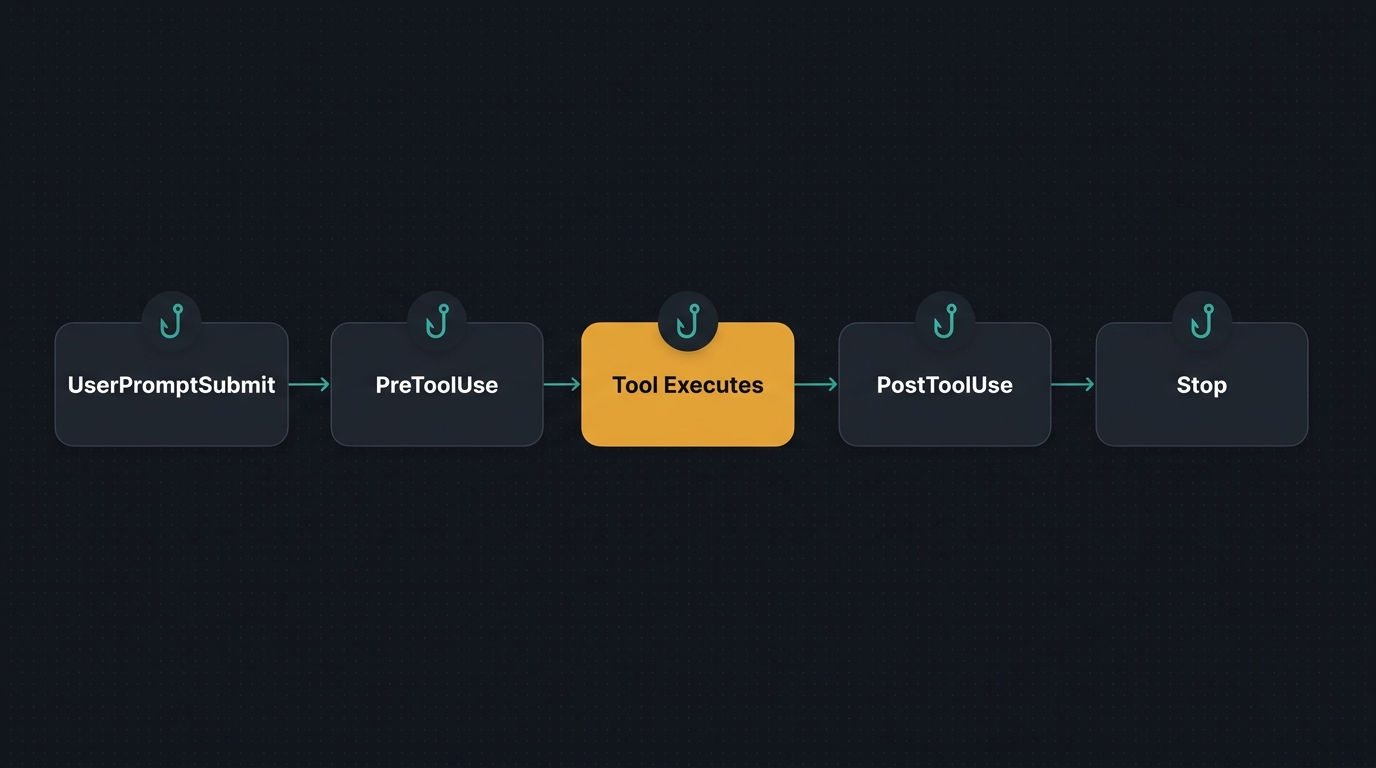 Where each hook fires in the lifecycle of a tool call. CLAUDE.md is advisory; hooks are guarantees.
Hooks are commands, HTTP endpoints, or MCP tools that fire at specific lifecycle points. Unlike CLAUDE.md (advisory), hooks guarantee the action. The model can’t ignore a shell script.
Five hooks earn their keep. Each one does exactly one thing.
Hook 1: PostToolUse formatter
Auto-format after every edit. Boris’s tip #9: “Claude usually generates well-formatted code, but the hook handles the last 10% so CI never fails on style.”
.claude/hooks/format.sh:
#!/usr/bin/env bash
set -euo pipefail
INPUT=$(cat)
FILE=$(echo "$INPUT" | jq -r '.tool_input.file_path // .tool_response.file_path // empty')
[ -z "$FILE" ] && exit 0
[ ! -f "$FILE" ] && exit 0

case "$FILE" in
  *.ts|*.tsx|*.js|*.jsx|*.json|*.md|*.css)
    npx --no-install prettier --write "$FILE" 2>/dev/null || true ;;
  *.py)
    command -v black >/dev/null && black -q "$FILE" 2>/dev/null || true
    command -v ruff  >/dev/null && ruff check --fix "$FILE" 2>/dev/null || true ;;
  *.go)
    gofmt -w "$FILE" 2>/dev/null || true ;;
  *.rs)
    rustfmt "$FILE" 2>/dev/null || true ;;
  *.sh)
    command -v shfmt >/dev/null && shfmt -w "$FILE" 2>/dev/null || true ;;
esac
exit 0
Hook 2: PreToolUse danger blocker
The hardstop on dangerous commands. Mirrors the official validate-bash.sh example from plugin-dev/skills/hook-development/examples.
.claude/hooks/danger-blocker.sh:
#!/usr/bin/env bash
set -euo pipefail
INPUT=$(cat)
CMD=$(echo "$INPUT" | jq -r '.tool_input.command // empty')

[ -z "$CMD" ] && { echo '{"continue": true}'; exit 0; }

deny() {
  echo "{\"hookSpecificOutput\":{\"hookEventName\":\"PreToolUse\",\"permissionDecision\":\"deny\",\"permissionDecisionReason\":\"$1\"}}" >&2
  exit 2
}

[[ "$CMD" == *"rm -rf /"*    ]] && deny "Destructive: rm -rf /"
[[ "$CMD" == *"rm -rf ~"*    ]] && deny "Destructive: rm -rf home"
[[ "$CMD" == *"rm -rf ."*    ]] && deny "Destructive: rm -rf . in cwd"
[[ "$CMD" == *"dd if="*      ]] && deny "Block-level dd"
[[ "$CMD" == *"mkfs"*        ]] && deny "Filesystem create"
[[ "$CMD" == *"> /dev/sd"*   ]] && deny "Raw device write"
[[ "$CMD" == *":(){ :|:&};:"* ]] && deny "Fork bomb"
[[ "$CMD" == *"curl"*"|"*"sh"* ]] && deny "curl|sh pattern"
[[ "$CMD" == *"wget"*"|"*"sh"* ]] && deny "wget|sh pattern"
[[ "$CMD" == *".env"* && "$CMD" == *">"* ]] && deny "Writing to .env"

exit 0
Hook 3: PreToolUse file protection
.claude/hooks/protect-files.sh:
#!/usr/bin/env bash
set -euo pipefail
INPUT=$(cat)
FILE=$(echo "$INPUT" | jq -r '.tool_input.file_path // empty')
[ -z "$FILE" ] && exit 0

deny() {
  echo "{\"hookSpecificOutput\":{\"hookEventName\":\"PreToolUse\",\"permissionDecision\":\"deny\",\"permissionDecisionReason\":\"Protected file: $1\"}}" >&2
  exit 2
}

case "$FILE" in
  */.env|*/.env.*)            deny "$FILE" ;;
  */secrets/*)                deny "$FILE" ;;
  */.git/config|*/.gitconfig) deny "$FILE" ;;
  */.ssh/*)                   deny "$FILE" ;;
  */node_modules/*)           deny "$FILE" ;;
  */.venv/*|*/venv/*)         deny "$FILE" ;;
  */dist/*|*/build/*)         deny "$FILE" ;;
esac
exit 0
Hook 4: Stop verifier
The single highest-ROI hook. When Claude says it’s done, run the tests. If they fail, force a re-loop. No more “I implemented it” followed by “wait, the tests are red.”
.claude/hooks/verify.sh:
#!/usr/bin/env bash
set -euo pipefail

# Only run if there are unstaged or staged changes
git diff --quiet && git diff --cached --quiet && exit 0

if   [ -f package.json ];   then npm test --silent 2>&1 | tail -50
elif [ -f Cargo.toml ];     then cargo test --quiet 2>&1 | tail -50
elif [ -f pyproject.toml ]; then pytest -q 2>&1 | tail -50
elif [ -f go.mod ];         then go test ./... 2>&1 | tail -50
fi

if [ ${PIPESTATUS[0]} -ne 0 ]; then
  echo '{"decision":"block","reason":"Tests failed. Fix them before stopping."}'
  exit 0
fi
exit 0
Hook 5: SessionStart context injector
Inject git state and active notes on every fresh session, so Claude isn’t starting cold.
.claude/hooks/inject-context.sh:
#!/usr/bin/env bash
set -euo pipefail
BRANCH=$(git branch --show-current 2>/dev/null || echo "no-git")
RECENT=$(git log --oneline -5 2>/dev/null || echo "")
DIRTY=$(git status --porcelain 2>/dev/null | wc -l | tr -d ' ')
NOTES=""
[ -f ./notes/active.md ] && NOTES=$(cat ./notes/active.md)

cat <<EOF
{
  "hookSpecificOutput": {
    "hookEventName": "SessionStart",
    "additionalContext": "## Repo State\n- Branch: $BRANCH ($DIRTY uncommitted files)\n- Recent commits:\n$RECENT\n\n## Active notes\n$NOTES"
  }
}
EOF
Make all hook scripts executable: chmod +x .claude/hooks/*.sh. The Notification hook in settings.json already covers the desktop ping via terminal-notifier on macOS. On Linux, swap for notify-send.
Five more hooks worth stealing
PreCompact — re-inject context after compaction. Boris’s tip via the team thread: when /compact collapses your transcript, key facts can drop. A PreCompact hook can preserve the must-survive bits.
{
  "hooks": {
    "PreCompact": [{
      "hooks": [{ "type": "command",
                  "command": "echo '{\"hookSpecificOutput\":{\"hookEventName\":\"PreCompact\",\"additionalContext\":\"PRESERVE: package manager is pnpm; do not switch back to npm. PRESERVE: secrets live in 1Password, never .env.\"}}'" }]
    }]
  }
}
SessionEnd — cleanup and digest.
{
  "hooks": {
    "SessionEnd": [{
      "hooks": [{ "type": "command",
                  "command": "echo \"[$(date)] session ended for ${CLAUDE_SESSION_ID:-unknown}\" >> ~/.claude/sessions.log; rm -f /tmp/claude-${CLAUDE_SESSION_ID:-x}.lock 2>/dev/null || true" }]
    }]
  }
}
Notification — desktop alert. macOS via terminal-notifier; Linux via notify-send.
{
  "hooks": {
    "Notification": [{
      "hooks": [{ "type": "command",
                  "command": "if command -v terminal-notifier >/dev/null; then terminal-notifier -title 'Claude' -message 'Needs input'; elif command -v notify-send >/dev/null; then notify-send 'Claude' 'Needs input'; fi" }]
    }]
  }
}
Hookify declarative .local.md rules (Anthropic plugin). Hookify reads markdown files at session start and dispatches them through a single Python orchestrator — power-user pattern for user-editable hooks without rewriting JSON every time.
---
name: block-dangerous-rm
enabled: true
event: bash
pattern: rm\s+-rf
action: block
---
Dangerous rm command detected.
Verify the path. Consider safer approach. Make sure you have backups.
---
name: warn-sensitive-files
enabled: true
event: file
action: warn
conditions:
- field: file_path
operator: regex_match
pattern: \.env$|\.env\.|credentials|secrets
---
Sensitive file detected.
- No hardcoded credentials
- Use env vars for secrets
- Verify in .gitignoreRalph-Wiggum auto-loop (Anthropic plugin, originally by Geoffrey Huntley). A Stop hook that re-prompts Claude with the same instructions until a <promise> token is emitted in the transcript. Use it for long-running specs that should run-until-passing without you babysitting.
#!/bin/bash
# Plugin: ralph-wiggum/hooks/stop-hook.sh
# Continuously re-prompts Claude until a completion <promise> is emitted.
# State: .claude/ralph-loop.local.md (frontmatter: iteration, max_iterations,
# completion_promise, prompt)
set -euo pipefail
HOOK_INPUT=$(cat)
RALPH_STATE_FILE=".claude/ralph-loop.local.md"
[[ ! -f "$RALPH_STATE_FILE" ]] && exit 0

FRONTMATTER=$(sed -n '/^---$/,/^---$/{/^---$/d; p}' "$RALPH_STATE_FILE")
ITERATION=$(echo "$FRONTMATTER" | grep '^iteration:' | sed 's/iteration: *//')
MAX_ITERATIONS=$(echo "$FRONTMATTER" | grep '^max_iterations:' | sed 's/max_iterations: *//')

if [[ $MAX_ITERATIONS -gt 0 ]] && [[ $ITERATION -ge $MAX_ITERATIONS ]]; then
  rm "$RALPH_STATE_FILE" ; exit 0
fi

TRANSCRIPT=$(echo "$HOOK_INPUT" | jq -r '.transcript_path')
LAST=$(grep '"role":"assistant"' "$TRANSCRIPT" | tail -1 \
       | jq -r '.message.content | map(select(.type=="text")) | map(.text) | join("\n")')

# Check for <promise>X</promise> matching completion_promise → done
# Otherwise emit re-prompt JSON to keep the loop going
echo '{"decision":"block","reason":"Continue iteration"}'
Combine ralph-wiggum with --permission-mode=dontAsk inside a sandbox and you get unattended overnight runs that converge on a passing test suite. Boris uses this exact combo for long-running tasks (his tip #11 from January).
The Full Hook Event Matrix
The five-hook starter kit covers 80% of needs. The full event surface is much wider, and once you know what fires when, you can wire deterministic behaviour into corners CLAUDE.md can’t reach.
| Event | When | Can block | Notable use |
|---|---|---|---|
SessionStart | Session opens | No | Inject git state, repo notes, branch banner |
SessionEnd | Session closes | No | Cleanup, log, archive transcript |
UserPromptSubmit | Before Claude sees your message | Yes | Strip secrets, redact PII, expand shorthands |
UserPromptExpansion | Slash-command expansion | Yes | Block /deploy without approval, modify args |
PreToolUse | Before tool fires | Yes | Block dangerous commands, route to classifier |
PermissionRequest | Permission dialog shown | Yes | Auto-respond based on policy |
PostToolUse | After tool completes | Yes | Format, lint, log, audit |
PostToolUseFailure | After tool fails | Yes | Retry logic, alert |
PostToolBatch | After parallel tool calls resolve | Yes | Batch-level audit |
PermissionDenied | Auto-mode classifier denied a tool | Yes | Return {retry:true} to grant a one-shot allow |
SubagentStart, SubagentStop | Subagent boundaries | Yes (Stop) | Audit subagent transcripts |
TaskCreated, TaskCompleted | Task graph events | No | Progress tracking |
TeammateIdle | Agent-team teammate going idle | No | Reassign work |
Stop, StopFailure | End of turn | Yes (Stop) | Verify, lint, prevent stop on red CI |
Notification | A notification fires | No | Desktop ping, sound |
InstructionsLoaded | CLAUDE.md / rules file loaded | No | Debug what’s actually in context |
ConfigChange | Settings file changed | No | Audit log for compliance |
CwdChanged | Working directory changes | No | direnv export bash, env reload |
FileChanged | Tracked file changed externally | No | Re-read, invalidate caches |
WorktreeCreate, WorktreeRemove | Git worktree lifecycle | No | Replace default behaviour, copy .env |
PreCompact, PostCompact | Around compaction | Yes (PreCompact) | Preserve must-survive context |
Elicitation, ElicitationResult | MCP server requesting user input | Yes | Auto-respond to prompts |
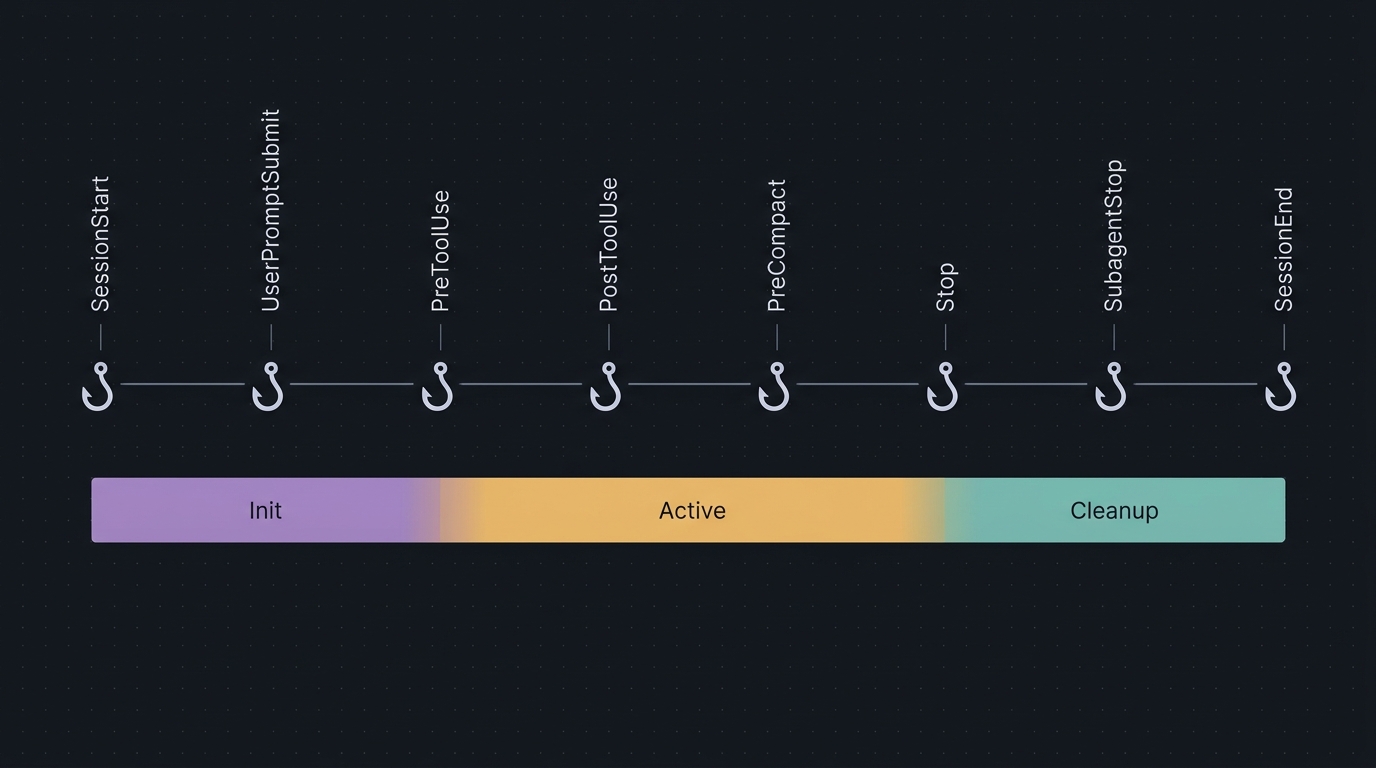 Where each of the 15 hook events fires in the request lifecycle.
Hook handler types
There are four types now (since v2.1.118):
type: "command"— shell command. Stdin is JSON, stdout is JSON. The classic, cheapest, fastest.type: "http"— HTTP webhook. Useful for centralised audit, multi-machine policy.type: "mcp_tool"— invoke an MCP tool from a hook (v2.1.118+). Lets you call out to a hosted classifier or notification system without writing shell.type: "prompt"— LLM-driven hook. The hook itself calls a model with the prompt, and the verdict goes back. Supported onStop,SubagentStop,UserPromptSubmit,PreToolUse. This is what powers Boris’s “Opus permission classifier” tip — the LLM catches edge cases that a regex never could.
{
  "hooks": {
    "PreToolUse": [{
      "matcher": "Bash",
      "hooks": [{
        "type": "prompt",
        "prompt": "Evaluate if this Bash invocation should be allowed. Tool input: $TOOL_INPUT. Return ALLOW/ASK/DENY only.",
        "timeout": 30
      }]
    }]
  }
}
Handler input and output
Stdin: JSON like { "tool_name": "Bash", "tool_input": {...}, "session_id": "...", "cwd": "...", "transcript_path": "..." }. As of v2.1.119, PostToolUse input also includes duration_ms for perf metrics.
Stdout: two control paths.
- Exit codes:
0= proceed (stdout forUserPromptSubmit/SessionStartis added to Claude’s context);2= block, stderr → Claude as feedback; other = proceed but show error in transcript. - Structured JSON (preferred):
{
  "hookSpecificOutput": {
    "hookEventName": "PreToolUse",
    "permissionDecision": "deny",
    "permissionDecisionReason": "Destructive command blocked"
  }
}
Other JSON fields: continue (boolean), stopReason, suppressOutput, additionalContext, updatedInput (modify the tool call before execution).
if short-circuit and matchers
Two perf wins worth knowing:
if: "Bash(rm *)"at the handler level avoids spawning the handler process for every Bash call — the matcher short-circuits before the handler runs.- Matcher syntax supports regex-style alternations:
"Edit|Write|MultiEdit". Plain string:"Bash". Specifier:"Bash(npm run *)". Wildcard:"*"or omitted.
Identical hook commands across scopes are deduplicated automatically — handy when you commit a hook to project settings and have the same one in your user settings.
Debugging hooks
Enable an InstructionsLoaded hook that logs every CLAUDE.md and rule file the session loads. Half the time “Claude isn’t following my rule” actually means “the rule file isn’t loading,” and this hook tells you instantly.
{
  "hooks": {
    "InstructionsLoaded": [{
      "hooks": [{ "type": "command",
                  "command": "echo \"[$(date)] loaded $CLAUDE_INSTRUCTIONS_PATH\" >> ~/.claude/loaded.log" }]
    }]
  }
}
For enterprises, the killer combination is allowedHttpHookUrls (allowlist) + allowManagedHooksOnly: true — distribute vetted hooks via plugins, prevent users from adding their own.
The Slash Commands Worth Stealing
Drop these in .claude/commands/<name>.md. The body is a prompt; backticks with ! execute commands inline and inject the output before Claude sees the prompt.
Frontmatter spec for commands
---
description: One-line summary shown in /
argument-hint: <path> [--flag]                  # autocomplete
allowed-tools: Bash(git add:*), Bash(git commit:*), mcp__github_inline_comment__*
---
/commit (Anthropic official, from commit-commands plugin)
---
allowed-tools: Bash(git add:*), Bash(git status:*), Bash(git commit:*)
description: Create a git commit
---

## Context
- Current git status: !`git status`
- Current git diff (staged and unstaged changes): !`git diff HEAD`
- Current branch: !`git branch --show-current`
- Recent commits: !`git log --oneline -10`

## Your task
Based on the above changes, create a single git commit.
You have the capability to call multiple tools in a single response. Stage and
create the commit using a single message. Do not use any other tools or do
anything else.
/commit-push-pr — Boris’s most-used
The one that goes from “I’m done” to a PR URL in one shot. Boris’s tip #6 from January: “Lives in .claude/commands/, checked into git. Uses inline bash to pre-compute git status / context so Claude doesn’t have to back-and-forth.”
---
allowed-tools: Bash(git checkout:*), Bash(git add:*), Bash(git status:*), Bash(git push:*), Bash(git commit:*), Bash(gh pr create:*)
description: Commit, push, and open a PR
argument-hint: [optional summary]
---

## Context
- Status: !`git status`
- Diff: !`git diff HEAD`
- Branch: !`git branch --show-current`
- Recent: !`git log --oneline -10`

## Your task
1. Create a new branch if on main/master
2. Create a single commit with a descriptive conventional message
   (feat:/fix:/refactor:/docs:/test:/chore:)
3. Co-Authored-By: Claude <noreply@anthropic.com>
4. Push the branch with `-u` if needed
5. Create a pull request using `gh pr create` with summary + test plan
6. You MUST do all of the above in a single response via parallel tool calls.
/code-review (Anthropic flagship)
The most sophisticated command Anthropic ships. Spawns four parallel Sonnet/Opus reviewers, validates each issue with a follow-up subagent, and only flags HIGH SIGNAL items. Worth the read just for the orchestration pattern.
---
allowed-tools: Bash(gh pr view:*), Bash(gh pr diff:*), Bash(gh pr comment:*), mcp__github_inline_comment__create_inline_comment
description: Code review a pull request
argument-hint: <PR-number> [--comment]
---

Provide a code review for the given pull request.

Agent assumptions: All tools are functional. Do NOT test tools / make
exploratory calls. Make sure this is clear to every subagent launched.

Steps:
1. Launch HAIKU agent → check if PR closed/draft/already-reviewed
2. Launch HAIKU agent → list relevant CLAUDE.md file paths
3. Launch SONNET agent → summarize the diff
4. Launch 4 SONNET/OPUS agents IN PARALLEL:
   • Agents 1+2 (Sonnet): CLAUDE.md compliance audit
   • Agent 3 (Opus): bug scan, diff-only context
   • Agent 4 (Opus): logic/security issues in changed code
5. For each issue, launch a validation subagent (Opus for bugs, Sonnet for compliance)
6. Filter to only validated issues
7. Summarize to terminal
8. If --comment provided: post inline comments via mcp__github_inline_comment

CRITICAL: Only HIGH SIGNAL issues:
- Code WILL fail to compile/parse
- Code WILL produce wrong results regardless of inputs
- Clear unambiguous CLAUDE.md violation (quote the rule)

Do NOT flag:
- Style/quality concerns
- Issues depending on specific inputs/state
- Subjective improvements
- Pedantic nitpicks
- Issues a linter would catch
- Pre-existing issues
- Issues silenced by lint comments

Inline comment format must use full SHA + L[start]-L[end]:
https://github.com/owner/repo/blob/<sha>/path#L4-L7
The lessons stitched into the body are why this command is good: explicit model tiers (Haiku → Sonnet → Opus), parallel where independent, validation pass for confidence, “high-signal only” filtering, and an explicit “do NOT flag” list. Steal the structure even if you don’t ship the command itself.
/feature-dev (Anthropic guided implementation)
The orchestration pattern for greenfield features. Three specialised agents, TodoWrite between phases:
---
description: Guided feature development with codebase understanding and architecture focus
argument-hint: Optional feature description
---

# Feature Development

## Core Principles
- Ask clarifying questions BEFORE implementation
- Understand before acting (read patterns first)
- After agents return file lists, READ those files to build detail
- Simple and elegant, readable, maintainable
- Use TodoWrite to track progress

## Phase 1: Discovery
1. Create todo list with all phases
2. Ask user: problem? feature? acceptance criteria?

## Phase 2: Exploration
- Launch code-explorer agent → return list of essential files
- Read each returned file deeply

## Phase 3: Design
- Launch code-architect → blueprint with file:line refs
- Confirm with user

## Phase 4: Implementation
- TodoWrite each step
- Test after each piece

## Phase 5: Review
- Launch code-reviewer agent
- Address issues
/techdebt
End-of-session debt sweep. Run before you stop for the day.
---
description: Find and kill duplicated code, dead exports, over-abstractions in the current package
allowed-tools: Read, Grep, Glob, Edit, MultiEdit, Bash(npm run *)
---

## Context
- Modified files this session: !`git diff --name-only HEAD`
- Untracked: !`git ls-files --others --exclude-standard`

## Your task
1. Find duplicated logic across the modified files
2. Find dead exports (exported symbols with zero references in the repo)
3. Find over-abstractions (single-call helpers, single-impl interfaces)
4. Propose a list of removals/inlinings — DO NOT change behavior
5. Wait for my approval. After approval, apply and run the test suite.
/ultrathink-plan
Force a structured 5-phase deep analysis before any major change. Always waits for approval before implementing.
---
description: Force structured 5-phase deep analysis. Always WAITS for approval before implementing.
argument-hint: <task description>
---

ultrathink

Analyze "$ARGUMENTS" through these 5 phases. Output each phase as a section.

## Phase 1: Problem Understanding
- Restate the problem in your own words
- List explicit + implicit requirements
- List unknowns to resolve

## Phase 2: Context Gathering
- Files / modules involved (cite paths)
- Existing patterns to follow / avoid (cite file:line)
- External dependencies + their versions

## Phase 3: Solution Design
Score each candidate on 5 axes (1-5 each):
- Complexity, Maintenance, Performance, Security, Testing
Pick the highest-total approach. Justify trade-offs.

## Phase 4: Edge Cases & Failure Modes
- Concurrency, partial failure, malicious input, scale, ops

## Phase 5: Recommendation
Numbered implementation steps with per-step verify check.

STOP. Wait for "approved" before writing any code.
/rev-engine
Iteratively critique a plan along six axes until it’s clean. Pair with /ultrathink-plan.
---
description: Iteratively critique a plan along 6 axes until no issues remain.
argument-hint: <path to plan or paste plan>
---

Critique the plan in $ARGUMENTS along these 6 axes. For each issue, output
{axis, severity, fix}. Repeat until you can return "No issues found".

Axes:
1. Edge cases the plan misses
2. Failure modes (network, partial-write, crash recovery)
3. Redundancy / steps that could be removed
4. Ordering / dependency mistakes
5. Test coverage gaps (which steps lack a verify check)
6. Security holes (auth, injection, secret handling)

Output:
- Iteration 1: list of issues + proposed fixes
- Updated plan
- Iteration 2: re-critique the updated plan
- ... repeat until clean/simplify, /sync, /focus, /recaps
Five short ones rounding out the kit:
---
description: Simplify the diff without changing behavior
allowed-tools: Read, Edit, MultiEdit, Bash(npm test:*)
---

ultrathink

Read the current diff: !`git diff HEAD`

Apply the @code-simplifier agent. After every change, run tests.
If a test breaks, revert that change.
Output: list of simplifications applied + diff size reduction.
/sync was already shown above (the cross-tool 7-day context dump skill).
/focus is built-in (since v2.1.110): hides intermediate work, shows only the final result. Use it when you trust the model and don’t want to watch every tool call.
/recaps is built-in (since v2.1.110): short summaries of what an agent did and what’s next. Disable in /config if it adds noise; useful for resuming long sessions.
/btw is built-in: ask a side question that never enters history. Answers in a dismissible overlay. Save it for “what does this regex mean?” interruptions during a focused refactor.
Built-in commands worth knowing
| Command | Use |
|---|---|
/clear | Wipe context completely (better than /compact for new tasks) |
/compact | Summarize history when running long; pass instructions: /compact Focus on code samples and API usage |
| `/effort low | medium |
/permissions | Edit allowlist mid-session |
/statusline | Customise status bar |
/config | Toggle output style, recaps, etc. |
/agents | Manage subagents |
/skills | Browse/inspect installed skills |
/install-github-action | Set up @claude in PRs |
/usage | Replaces /cost and /stats (since v2.1.118). Tier limits + session cost. |
/context | Inspect what’s in the active context window |
/memory | List loaded CLAUDE.md / rules / auto-memory; toggle auto-memory |
/rewind | Open the checkpoint menu (Esc-Esc shortcut) |
/teleport | Hand off between Claude.ai web/iOS and terminal |
/sandbox | Enable OS-level isolation |
/doctor | Diagnostics |
/debug | Verbose debugging mode |
/loop | Built-in skill for repeating a prompt within a session |
/schedule | Recurring tasks (Routines, Anthropic infra) |
/fork, /branch | Session forking |
/rename | Name a session for --resume discoverability |
The 5 MCPs That Actually Pay Off
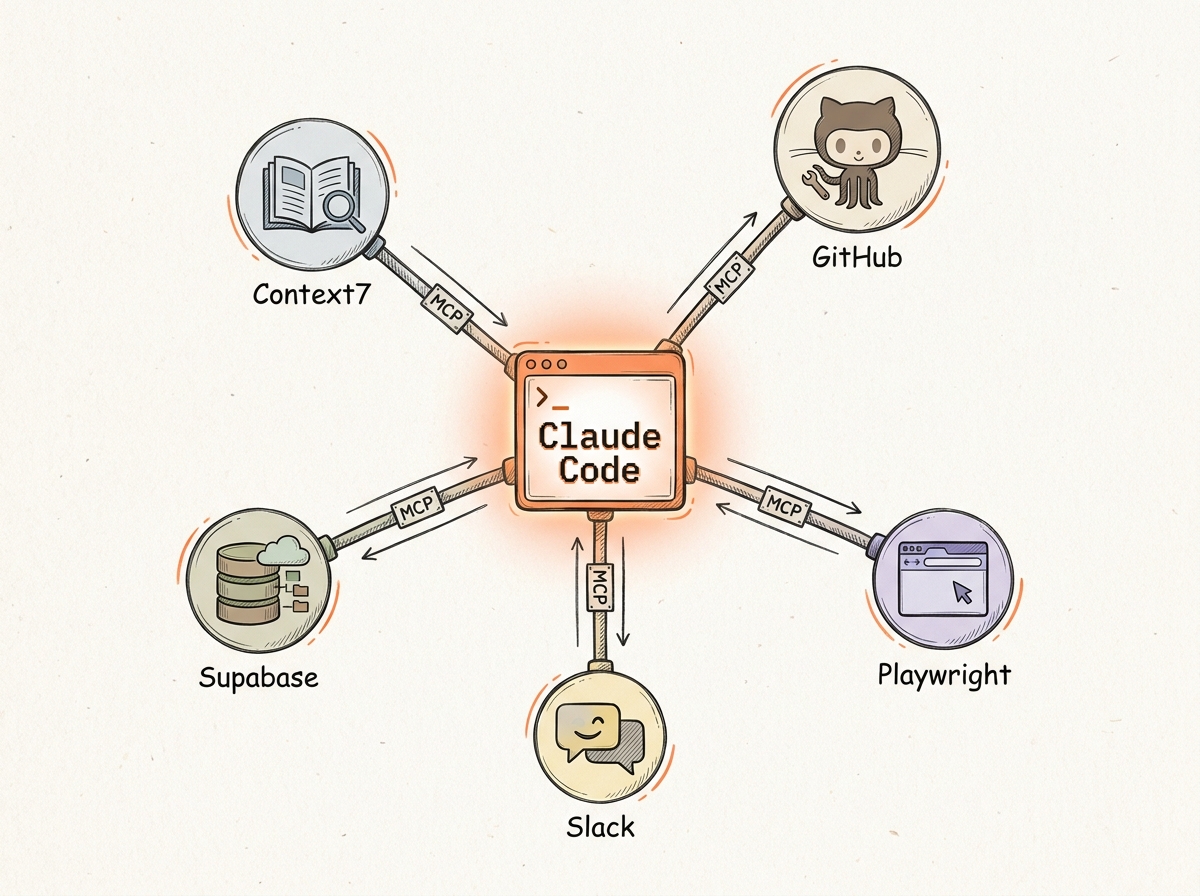 The five MCPs worth your context budget. Boris’s rule: “You’ll keep five of fifteen.”
Boris’s pattern, repeated across multiple threads: install 15 day one, keep 5 after three months. Each MCP’s tool descriptions enter your context every session — so MCP bloat is permanent context tax. The five below are the keepers across every team that’s posted their setup.
Important caveat from the official docs: CLI tools (gh, aws, gcloud, bq, sentry-cli) are more context-efficient than MCP servers because their tool listings don’t enter context. Use MCP only when you need real-time push (Slack channels) or when no CLI exists. Boris uses bq directly for BigQuery for exactly this reason — and famously “hasn’t written SQL in 6 months.”
Drop the combined config into .mcp.json at your project root and commit it:
{
  "mcpServers": {
    "context7":   {
      "command": "npx",
      "args": ["-y", "@upstash/context7-mcp@latest"],
      "env": { "CONTEXT7_API_KEY": "${CONTEXT7_API_KEY}" }
    },
    "github":     {
      "type": "http",
      "url": "https://api.githubcopilot.com/mcp/",
      "headers": { "Authorization": "Bearer ${GITHUB_TOKEN}" }
    },
    "playwright": {
      "command": "npx",
      "args": ["@playwright/mcp@latest"]
    },
    "postgres":   {
      "command": "npx",
      "args": ["-y", "@modelcontextprotocol/server-postgres"],
      "env": { "POSTGRES_CONNECTION_STRING": "${DATABASE_URL}" }
    },
    "slack":      {
      "type": "http",
      "url": "https://mcp.slack.com/mcp"
    }
  }
}
The why for each:
- Context7 is the highest-ROI MCP, period. Add
use context7to any prompt and Claude pulls the exact, version-correct docs page. No more hallucinated APIs from libraries that changed three releases ago. - GitHub is non-negotiable if you ship code. Issue triage, PR review,
gh pr create— all of it. - Playwright is the verification half of
/go. Boris (Jan thread): “For frontend, Claude tests every change with the Claude Chrome extension — opens browser, tests UI, iterates until UX feels good.” Playwright MCP is the same thing without the extension dependency. - Postgres/Supabase in
--read-onlymode. You don’t want Claude doing it in write mode either, until you’ve burned a few weeks of trust. - Slack for incoming bug context. Boris’s #1 workflow tip from January: “Paste a Slack thread, just say ‘fix’.”
Audit /context and /mcp regularly. If you haven’t used a server in a month, kill it.
MCP Advanced Configuration
Five MCPs is the right ceiling, but knowing the full machinery underneath them — transports, scopes, OAuth, channels — is what lets you actually run them in a team setting without weird breakage.
The four transports
| Transport | When to use |
|---|---|
| stdio | Local process. Most common. Best for CLI-style tools, secret-handling, system access. No auto-reconnect (it’s just a child process). |
| HTTP | Remote server with token auth. Recommended for hosted MCPs. Auto-reconnect: 5 attempts, exponential backoff. |
| SSE | Hosted with OAuth. Older. Use HTTP where possible; SSE is being phased out for new Anthropic-hosted servers. |
| WebSocket | Bidirectional streaming. Used internally by some channel-based MCPs (e.g. real-time chat MCPs). |
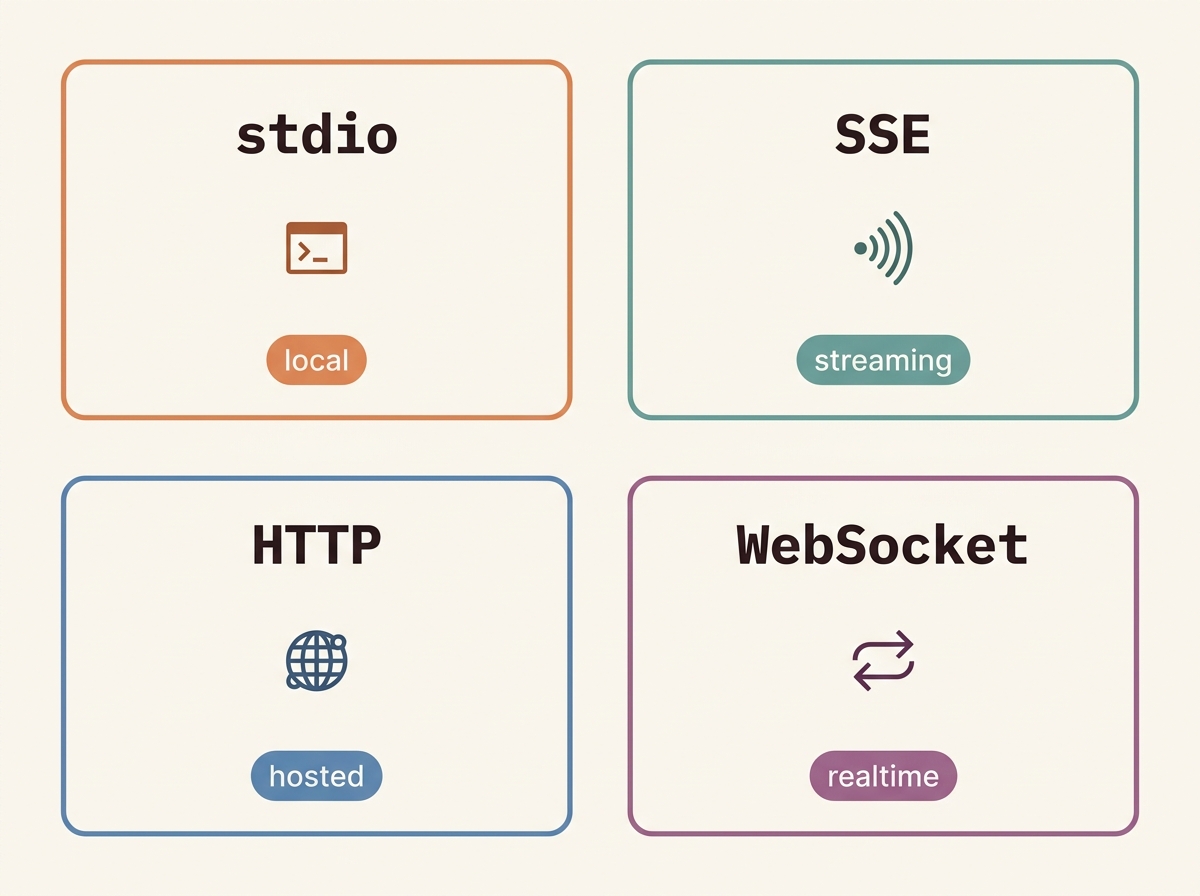 The four MCP transports and when to pick each.
# 1. Remote HTTP (recommended for cloud)
claude mcp add --transport http notion https://mcp.notion.com/mcp
claude mcp add --transport http secure-api https://api.example.com/mcp \
  --header "Authorization: Bearer $TOKEN"

# 2. Remote SSE (deprecated, use HTTP where possible)
claude mcp add --transport sse asana https://mcp.asana.com/sse

# 3. Local stdio (custom scripts, system access)
claude mcp add --transport stdio --env AIRTABLE_API_KEY=$KEY airtable \
  -- npx -y airtable-mcp-server
Argument order matters: all flags before the name, then --, then the command + args. Get it wrong and your env vars leak into the wrong slot.
The three scopes
| Scope | Loads in | Shared | Storage |
|---|---|---|---|
| Local (default) | Current project only | No | ~/.claude.json |
| Project | Current project | Yes (committed) | .mcp.json (project root) |
| User | All your projects | No | ~/.claude.json |
Precedence on duplicate names: local > project > user > plugin > Claude.ai connector. Plugins/connectors match by endpoint, not name, so renaming doesn’t help.
.mcp.json with environment variable expansion
{
  "mcpServers": {
    "api-server": {
      "type": "http",
      "url": "${API_BASE_URL:-https://api.example.com}/mcp",
      "headers": { "Authorization": "Bearer ${API_KEY}" }
    }
  }
}
The ${VAR:-default} syntax is real. Use it for sane defaults that work both in dev and CI.
Permission keys for MCP tools
MCP tools live behind permission rules with the mcp__servername__toolname shape:
{
  "permissions": {
    "allow": [
      "mcp__context7__*",                              // all tools from context7
      "mcp__github__list_pull_requests",               // specific tool
      "MCP(slack:search_messages)"                     // alternate syntax
    ],
    "deny": [
      "mcp__github__delete_repository"
    ]
  }
}
OAuth specifics
For HTTP/SSE servers that require OAuth:
--oauth-callback-port <n>— pin the local callback port for firewalls--client-id/--client-secret— override discovered client metadata--scope <scope>— restrict requested scopesheadersHelper— script that prints headers JSON for custom auth (pairs withapiKeyHelperfor token rotation)
The first time you hit an OAuth-gated server, Claude opens a browser, you authorise, and the token lands in ~/.claude.json encrypted with the OS keychain (macOS Keychain, libsecret/kwallet on Linux, DPAPI on Windows).
Debugging MCP servers
Three commands that will save you hours:
claude mcp list— every registered server, scope, status, transport.claude mcp get <name>— full config for one server, including resolved env./mcpinside Claude Code — interactive view with OAuth status, channel subscriptions, last error.
Logs land in ~/.claude/logs/mcp-<servername>.log. If a server times out on connect, look there first.
MCP Tool Search
When ENABLE_TOOL_SEARCH=true is set, MCP servers register deferred tool definitions — only tool names enter context until a tool is actually used. This is a huge win for servers like the GitHub MCP, which exposes 50+ tools you mostly don’t use. The feature is disabled by default when ANTHROPIC_BASE_URL is non-first-party (gateways), so set it explicitly if your gateway forwards tool_reference blocks.
Channels (push to Claude)
Channels (--channels plugin:<name>@<marketplace>) let MCP servers push messages into the session without you prompting. CI pipeline finished. Sentry fired an alert. New PR comment from a teammate. Each push appears as a system message Claude can react to.
Pair channels with the Notification hook to ping you on the desktop the moment something needs attention. This is the closest thing Claude Code has to “always-on agent.”
Why the “5 of 15” rule actually holds
Each tool definition costs 100-300 tokens of context for its name + description + parameters schema. A server with 30 tools costs ~5K tokens every session, forever. Multiply by five servers and you’ve sunk 25K tokens before saying hello. That’s why the keepers list converges on 5 — past that, the marginal MCP costs more context than it earns.
Managed MCP
allowedMcpServers (allowlist) + deniedMcpServers (denylist, always merges) + allowManagedMcpServersOnly: true lock down what users can install. Drop-in managed-mcp.json deploys org MCPs centrally. strictKnownMarketplaces: true restricts plugin marketplace adds to a vetted list.
Model + Effort Tuning
The aliases:
| Alias | Resolves to | Use |
|---|---|---|
default | Account default — Max/Team Premium → Opus 4.7; others → Sonnet 4.6 | Sane fallback |
best | Most capable available (currently opus) | Hardest problems |
opusplan | Opus during plan mode, Sonnet during execute | Best default |
opus | Opus 4.7 (Anthropic) / Opus 4.6 (Bedrock/Vertex) | Hardest reasoning |
sonnet | Sonnet 4.6 (Anthropic) / Sonnet 4.5 (Bedrock/Vertex) | Most coding |
haiku | Haiku latest | Fast triage / simple subagents |
opus[1m] / sonnet[1m] | 1M-token context variants | Giant codebase work |
The opusplan trick is Boris’s vanilla default. Plan in Opus on high effort for accuracy → switch to Sonnet for speed during implementation → verify in Opus again. The alias does the swap automatically and never auto-upgrades to 1M context (plan-mode work doesn’t need it).
Setting precedence: /model (session) > --model (startup) > ANTHROPIC_MODEL env > model setting.
Pin via env vars when you’re on Bedrock or Vertex and the alias resolution differs:
export ANTHROPIC_DEFAULT_OPUS_MODEL=claude-opus-4-7
export ANTHROPIC_DEFAULT_SONNET_MODEL=claude-sonnet-4-6
export ANTHROPIC_DEFAULT_HAIKU_MODEL=claude-haiku-4
Or modelOverrides in managed settings to remap globally for your org.
Effort levels (adaptive reasoning)
Supported on Opus 4.7, Opus 4.6, Sonnet 4.6.
| Model | Available |
|---|---|
| Opus 4.7 | low, medium, high, xhigh, max |
| Opus 4.6 / Sonnet 4.6 | low, medium, high, max |
Defaults (since v2.1.117): xhigh on Opus 4.7, high on Opus 4.6 and Sonnet 4.6. Use xhigh as your default — it’s been the Opus default for a reason. max is real but it can over-think; reserve it for security audits and critical refactors.
| Level | When |
|---|---|
low | Renaming, trivial edits, scoped/latency-sensitive |
medium | Cost-sensitive, modest intelligence trade-off |
high | Balanced; minimum for intelligence-sensitive work |
xhigh | Recommended default on Opus 4.7 |
max | Demanding; can over-think; session-only by default |
Set effort five ways, in precedence order:
CLAUDE_CODE_EFFORT_LEVEL=xhighenv var (beats everything)effortin skill/agent frontmatter (per-invocation)effortLevelinsettings.json(project default)/effort xhighslash command (session)--effort xhighCLI flag (one-shot)
Adaptive reasoning means the model decides per-step. To force more thinking on a single turn: include ultrathink in your prompt (in-context instruction, not an effort change). On Opus 4.6 / Sonnet 4.6 only, set CLAUDE_CODE_DISABLE_ADAPTIVE_THINKING=1 to revert to the fixed MAX_THINKING_TOKENS budget. Opus 4.7 always uses adaptive.
You’re billed for thinking tokens even when the summary is redacted in interactive mode. showThinkingSummaries: true in settings to see them; Ctrl+O toggles verbose to expose them inline.
ultrathink — the deep-reasoning escape hatch
Type ultrathink anywhere in your prompt to trigger the maximum thinking budget (~31,999 tokens) for that turn. Anthropic removed it in late Q1 2026 and restored it in v2.1.68 after a community revolt — hundreds of bug reports about quality regressions. Use it when stakes are high.
ultrathink — design the cache invalidation for the user-permissions service.
List 3 candidate strategies, score them on consistency / latency / complexity,
recommend one with a step-by-step migration plan.
The haiku→opus trick (read the cost warning first)
export ANTHROPIC_DEFAULT_HAIKU_MODEL=claude-opus-4-7What this does: every subagent, classifier, and hook that defaults to model: haiku (and there are many — code-review uses Haiku for the closed/draft check, permission classifiers, PR triage) silently runs on Opus 4.7 instead.
Cost warning, read it twice. Background usage is roughly $0.04 per session under default settings. With this set, you’re multiplying that by 10x. Only enable on Max or Team plans where you’ve explicitly thought about it. If you want to audit first, pair with CLAUDE_CODE_DISABLE_BACKGROUND_TASKS=1 to see what would have run.
When it is worth it: classifier accuracy noticeably improves when permission routing runs on Opus. When it is not: anything billed by the call. Do not enable this on a Pro plan.
Shift+Tab — the cycle
Default → Auto-Accept Edits → Plan → (Auto, if your plan supports it) → Default. This is the single biggest UX win in 2026. Plan a change, accept it, switch to acceptEdits, watch Claude one-shot the implementation. Learn the cycle, use it every PR.
Output Styles + Statusline
Output styles
Output styles modify the system prompt itself, turning off Claude Code’s coding-specific bits unless you keep them with keep-coding-instructions: true. Built-ins:
- Default — standard
- Concise — minimum prose
- Explanatory — explains the why
- Learning — pedagogical, asks comprehension questions, adds
TODO(human)markers - Code-only — no commentary
Boris’s tip #10: toggle Explanatory or Learning when using Claude Code as a tutor. “Have Claude generate a visual HTML presentation explaining unfamiliar code. It makes surprisingly good slides.” The Anthropic docs add: ask for ASCII diagrams of new protocols/codebases — faster comprehension than reading the docs.
Custom style at .claude/output-styles/<name>.md:
---
name: My Style
description: Shown in /config picker
keep-coding-instructions: false
---

# Custom Style Instructions
You are an interactive CLI tool that helps users with software engineering tasks. ...
Set via /config → Output style, or outputStyle setting. Change takes effect next session start — preserves prompt-cache stability.
When to use what
- Output style for sustained voice/format change (always active).
- CLAUDE.md for project-specific facts and rules.
--append-system-promptfor one-off automation runs (must pass every invocation).- Subagent for task-specific specialisation with own tools/model.
- Skill for invocable workflows.
Statusline
{
  "statusLine": { "type": "command", "command": "~/.claude/statusline.sh", "padding": 2 }
}
Or use /statusline and ask Claude to generate one: “/statusline show model name and context percentage with a progress bar.”
The stdin JSON your script receives includes (since v2.1.119):
{
  "model": { "display_name": "Opus 4.7", "id": "claude-opus-4-7" },
  "cwd": "/Users/me/projects/foo",
  "git": { "branch": "feature-x", "uncommitted": 3 },
  "cost": { "total_usd": 0.42 },
  "duration": { "session_ms": 1820000 },
  "context_window": { "used": 78032, "total": 200000, "percentage": 39 },
  "rate_limits": { "5h_remaining_pct": 87, "7d_remaining_pct": 65 },
  "vim": { "mode": "normal" },
  "agent": { "name": "code-reviewer" },
  "effort": { "level": "xhigh" },
  "thinking": { "enabled": true }
}
A real, useful statusline:
#!/usr/bin/env bash
# ~/.claude/statusline.sh
INPUT=$(cat)
MODEL=$(jq -r '.model.display_name' <<<"$INPUT")
DIR=$(jq -r '.workspace.current_dir // .cwd' <<<"$INPUT")
PCT=$(jq -r '.context_window.percentage // 0' <<<"$INPUT")
EFFORT=$(jq -r '.effort.level // "auto"' <<<"$INPUT")
THINK=$(jq -r '.thinking.enabled // false' <<<"$INPUT")

BRANCH=""
if git rev-parse --git-dir >/dev/null 2>&1; then
  B=$(git branch --show-current 2>/dev/null)
  C=$(git status --porcelain 2>/dev/null | wc -l | tr -d ' ')
  BRANCH=" | 🌿 $B"
  [ "$C" -gt 0 ] && BRANCH="$BRANCH ($C)"
fi

# Color the context % if dying
COLOR=""
if   [ "$PCT" -gt 80 ]; then COLOR="\033[31m"   # red
elif [ "$PCT" -gt 60 ]; then COLOR="\033[33m"   # yellow
fi

THINK_FLAG=""
[ "$THINK" = "true" ] && THINK_FLAG="🧠"

echo -e "[$MODEL · $EFFORT $THINK_FLAG] 📁 ${DIR##*/}${BRANCH} | ctx: ${COLOR}${PCT}%\033[0m"
davila7/claude-code-templates ships 25+ statusline variants — git-aware, multi-line, clickable, rate-limit aware, cost-tracking. Worth a browse.
Headless / SDK / CI
Claude Code in scripts is a different beast. The -p flag (or its alias --print) runs one prompt and exits. Combined with --allowedTools and --output-format, you have a coding agent that fits inside a CI step.
The flags that matter
# Single-turn, default output
claude -p "Find and fix the bug in auth.py" --allowedTools "Read,Edit,Bash"

# Structured JSON
claude -p "List all API endpoints" --output-format json

# Streaming (one JSON object per line — perfect for piping to a UI)
claude -p "Analyze this log file" --output-format stream-json

# Pipe in stdin
cat error.log | claude -p "Summarize the failures"
Key flags for automation:
--bare(orCLAUDE_CODE_SIMPLE=1) — skip plugins, skills, hooks, MCP, CLAUDE.md, auto-memory autodiscovery. Huge speedup, minimal capabilities. Use for scripted one-shots that don’t need your full setup.--allowedTools "Read,Edit,Bash(git *)"— pattern-matched permission rules for this run only.--disallowedTools— same but inverse.--exclude-dynamic-system-prompt-sections— moves per-machine info into the first user message → better prompt-cache reuse across users on the same task.--fallback-model sonnet— fall back when default is overloaded.--include-hook-events --output-format stream-json— full lifecycle observability for monitoring.--include-partial-messages— partial streaming events.--init-only— run init hooks then exit (sandbox warmup in CI).--system-prompt/--system-prompt-file(replace) vs--append-system-prompt/--append-system-prompt-file(default). For most use cases: append. Replacement is for turning Claude Code into a non-coding agent.
Fan-out across files
for file in $(cat files.txt); do
  claude -p "Migrate $file from React to Vue. Return OK or FAIL." \
    --allowedTools "Edit,Bash(git commit *)"
done
Refine the prompt on the first 2-3 files, then run at scale. --allowedTools is what makes unattended runs safe.
The Claude Code GitHub Action
Boris’s tip #4 from January: tag @claude in PR review comments and the action either appends a rule to CLAUDE.md or implements the suggested change as a new commit on the PR branch. Install with claude /install-github-action.
A minimal workflow:
name: Claude Code
on:
  issue_comment:
    types: [created]
  pull_request_review_comment:
    types: [created]

jobs:
  claude:
    if: contains(github.event.comment.body, '@claude')
    runs-on: ubuntu-latest
    permissions:
      contents: write
      pull-requests: write
    steps:
      - uses: actions/checkout@v4
        with: { fetch-depth: 0 }
      - uses: anthropics/claude-code-action@v1
        with:
          anthropic_api_key: ${{ secrets.ANTHROPIC_API_KEY }}
          allowed_tools: "Read,Edit,Bash(npm test)"
This is the “Compounding Engineering” loop made concrete: every PR review comment can permanently modify the codebase or its rules.
Schedule and remote
/loop(bundled skill) repeats a prompt within a session./schedule(Routines) runs on Anthropic infra — even when your machine is off.- Desktop scheduled tasks — runs locally, full file access.
- Remote Control (
claude remote-control) — drive a local session from claude.ai or mobile. Since v2.1.110,/context,/exit,/reload-pluginswork from mobile too. - Channels push from Telegram, Discord, iMessage, custom webhooks into a session.
The Agent SDK
The Agent SDK (TypeScript + Python) wraps -p with structured outputs, tool approval callbacks, and native message objects. Mckay Wrigley calls it “the best open secret in AI right now — the best agentic harness in the world.” When you want Claude as a programmable component inside a larger system, this is the door.
Sandboxing + Security
Sandboxing is the layer below permissions. Permissions decide what Claude is allowed to ask for. The sandbox decides what the OS is allowed to honor. Defence-in-depth.
Enable it
claude /sandbox # interactiveOn Linux, requires bubblewrap and socat. On macOS, uses sandbox-exec. On Windows it’s a no-op (use WSL).
Two modes:
- Auto-allow: Bash runs sandboxed without permission prompt; commands needing un-sandboxed access fall back to the standard permission flow.
- Regular permissions: Every command goes through the standard flow even when sandboxed.
The full sandbox config
{
  "sandbox": {
    "enabled": true,
    "failIfUnavailable": true,
    "allowUnsandboxedCommands": false,
    "filesystem": {
      "allowWrite": ["~/.kube", "/tmp/build"],
      "denyRead": ["~/"],
      "allowRead": ["."]
    },
    "excludedCommands": ["docker *"]
  }
}
Path prefixes: /abs, ~/home, ./project-relative. denyRead/allowRead interact with Read(...) permission rules — managed allowManagedReadPathsOnly: true locks down what user/project allow lists can broaden.
Protected paths (never auto-approved in any mode)
Directories: .git, .vscode, .idea, .husky, .claude (with explicit exceptions for .claude/commands, .claude/agents, .claude/skills, .claude/worktrees).
Files: .gitconfig, .gitmodules, .bashrc, .bash_profile, .zshrc, .zprofile, .profile, .ripgreprc, .mcp.json, .claude.json.
These are protected even with bypassPermissions — Claude will refuse and emit a PermissionRequest.
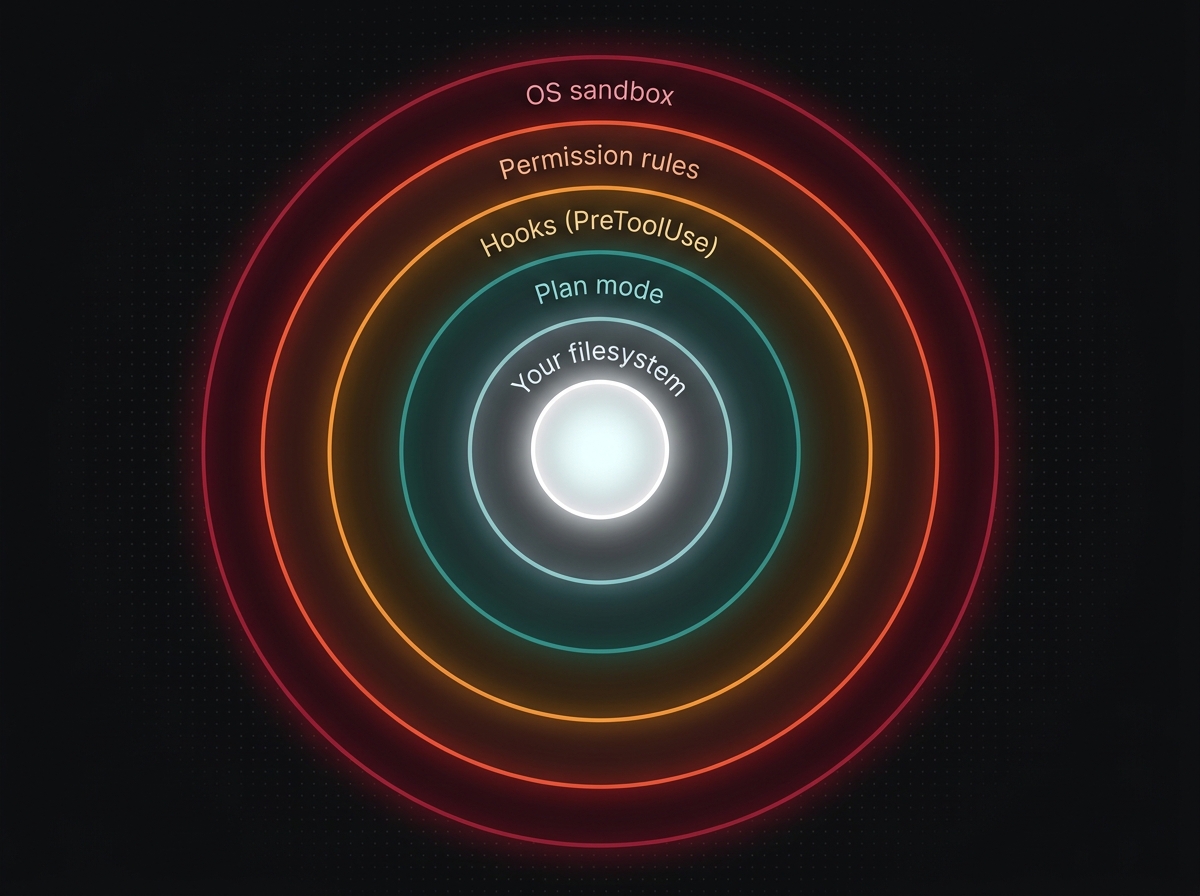 The defense-in-depth layers between Claude and your filesystem.
The escape hatch (and why to disable it)
When a command fails inside the sandbox, Claude may retry with dangerouslyDisableSandbox: true — which goes back through the normal permission flow but skips the sandbox layer. Set allowUnsandboxedCommands: false to forbid the retry entirely. Combined with failIfUnavailable: true, you get fail-closed behaviour: if the sandbox can’t enable, the session refuses to proceed.
What acceptEdits actually allows
A subtle one. acceptEdits mode auto-approves:
- All read-only tools (
Read,Glob,Grep,LS). - Edit, Write, MultiEdit on files inside the project tree.
- A small set of “common FS” commands:
mkdir,touch,mv,cp,rm(file-only, not-r). git add,git commit,git status,git diff(read+stage but not push).
It does not auto-approve git push, package installs, network requests, or anything that would mutate state outside the project tree. Lots of people fear acceptEdits thinking it’s dangerous — it’s actually the right mode for 90% of work.
The security-guidance hook
Anthropic’s security-guidance plugin ships a Python hook that flags eight common vulnerability patterns inline as Claude is about to write or edit code:
SECURITY_PATTERNS = [
  { "ruleName": "github_actions_workflow",
    "path_check": lambda p: ".github/workflows/" in p and (p.endswith(".yml") or p.endswith(".yaml")),
    "reminder": """Be aware:
1. Command Injection: Never use untrusted input directly in run: commands.
2. Use environment variables: env: TITLE: ${{ github.event.issue.title }} ; run: echo "$TITLE"
3. Risky inputs: github.event.issue.body, head_commit.message, github.head_ref, ..."""
  },
  { "ruleName": "child_process_exec",
    "substrings": ["child_process.exec", "exec(", "execSync("],
    "reminder": "Use execFileNoThrow instead — execFile is shell-safe."
  },
  { "ruleName": "eval_injection", "substrings": ["eval("],
    "reminder": "eval() executes arbitrary code." },
  { "ruleName": "dangerouslySetInnerHTML", "substrings": ["dangerouslySetInnerHTML"],
    "reminder": "Sanitize via DOMPurify or use safe alternatives." },
  { "ruleName": "innerHTML_xss", "substrings": [".innerHTML =", ".innerHTML="],
    "reminder": "Use textContent or DOMPurify." },
  { "ruleName": "pickle_deserialization", "substrings": ["pickle"],
    "reminder": "Pickle on untrusted data → arbitrary code exec. Use JSON." },
  { "ruleName": "os_system_injection", "substrings": ["os.system"],
    "reminder": "os.system with user input → command injection." }
]
# Session-scoped state file at ~/.claude/security_warnings_state_<session_id>.json
# ensures the same warning isn't shown twice per session.
{
"hooks": {
"PreToolUse": [{
"matcher": "Edit|Write|MultiEdit",
"hooks": [{ "type": "command",
"command": "python3 ${CLAUDE_PLUGIN_ROOT}/hooks/security_reminder_hook.py" }]
}]
}
}Install via claude plugin install security-guidance. It’s the cheapest possible upgrade to your security posture.
Built-in prompt-injection defences
Claude Code ships with several layers you don’t have to configure:
- Permission system + context-aware analysis + input sanitisation.
- Curated bash blocklist (
curl,wgetblocked by default). - Network requests require approval.
- WebFetch in isolated context window — the page content can’t influence the main conversation directly.
- Trust verification on first-time codebase + new MCP servers (disabled in
-pfor automation). - Fail-closed Bash matcher — unmatched patterns require manual approval.
- Encrypted credential storage (macOS Keychain, libsecret/kwallet on Linux, DPAPI on Windows).
- Windows WebDAV warning — never grant access to
\\*paths (deprecated, security risk).
The only meta-rule: don’t pipe untrusted content directly into claude. Untrusted Slack threads, untrusted PR descriptions, untrusted issue bodies — those are prompt-injection vectors. Sanitise or run inside a sandbox.
Checkpointing + Recovery
The most underused feature in Claude Code is the rewind. Every user prompt creates a checkpoint of edited files. You can rewind code, conversation, or both.
/rewind and Esc+Esc
Press Esc twice or run /rewind to open the menu:
- Restore code and conversation — both come back to that point
- Restore conversation only — keep your edits, lose the dialogue
- Restore code only — keep the dialogue, undo the edits
- Summarize from here — replaces selected message + everything after with a compressed summary; earlier context preserved in full
- Never mind
Checkpoints persist across sessions and clean up after 30 days (configurable via cleanupPeriodDays). Disable entirely with CLAUDE_CODE_DISABLE_FILE_CHECKPOINTING=1.
Limitations worth knowing:
- Bash-driven file changes are not tracked (
rm,mv,cpoutside Claude’s edit tools). The checkpoint is for what Claude edited via Edit/Write/MultiEdit, not arbitrary mutations. - External changes outside Claude’s edits aren’t tracked.
So: not a git replacement. A complement. Use git for hard checkpoints; use /rewind for soft “undo that turn” moves.
claude --continue and --resume
Sessions persist by directory. Three flags to bring them back:
claude -c                        # continue most recent in this dir
claude --resume                  # session picker (interactive)
claude -r "auth-refactor" "..."  # resume by name or ID
claude --resume abc123 --fork-session   # branch off without losing original
claude --from-pr 123             # resume sessions linked to a PR (GitHub/GitLab/Bitbucket)
Name sessions with /rename oauth-migration so they’re findable. Treat sessions like git branches — separate workstreams = separate persistent contexts.
/compact vs /clear
This is the most-confused pair in the toolset, and the answer is simple:
/clear— wipe context completely. Use when switching tasks. Faster, cleaner./compact— summarise history. Use when same task, just running long. Pass instructions:/compact Focus on code samples and API usage.
Behind the scenes, /compact writes a summary message to the transcript, drops earlier turns, and re-injects key skills (first 5KB each, 25KB total budget) plus your project-root CLAUDE.md. Subdirectory CLAUDE.md files reload lazily.
The auto-compact threshold is around 95% context usage by default. That’s too late — quality has already cratered. Set CLAUDE_AUTOCOMPACT_PCT_OVERRIDE=80 (or even 70 if you’re on a 1M-context model and your prompts are dense). The shanraisshan reference repo settled on 80 after testing.
A PreCompact hook can preserve must-survive context — see the hooks section above.
Recovering from corrupted state
If a session gets stuck — looping, refusing to proceed, behaving weirdly — try in order:
/clear— start fresh with the same CLAUDE.md and skills.- Esc Esc → “Restore conversation only” — keep your edits, reset the dialogue.
claude --resume <id> --fork-session— branch off the broken state, keep the original for forensics./doctor— diagnostic dump (slow but thorough).- Last resort:
rm -rf ~/.claude/projects/<project-hash>— nukes the project’s session storage. You lose history, but auto-memory and CLAUDE.md persist.
Cost Optimization Deep Dive
Most cost talk in Claude Code is hand-wavy. Here’s the actual math.
Track first
/usage— replaces/costand/statssince v2.1.118. Current session and tier limits.- Statusline showing context-window % and
$spent. claude -poutput formats for scripted accounting.
Background usage (auto-compact, status checks, classifiers) is typically <$0.04/session under defaults. The haiku→opus override multiplies that by ~10x. Math, not vibes.
Reduce token usage in priority order
This is the official priority list distilled from the docs:
/clearbetween unrelated tasks. Stale context costs every subsequent message. Boris on this:/clearis “free reset.”/compactwith instructions when running long:/compact Focus on code samples and API usage.- Right model. Sonnet for most coding; reserve Opus for hard reasoning. Haiku for simple subagents (
model: haikuin subagent frontmatter). - Reduce MCP overhead.
/contextto inspect; disable unused servers via/mcp. Prefer CLI tools. - Code intelligence plugins for typed languages — symbol nav beats grep+read.
- Hooks to preprocess data. A grep-for-
ERROR-only filter on test output before Claude sees it cuts thousands of tokens. - Move heavy CLAUDE.md content into skills. Skills load on demand; CLAUDE.md every session.
- Adjust thinking.
/effort medium,/config→ thinking off,MAX_THINKING_TOKENS=8000. - Subagents for verbose ops. Test runs, log scans, doc fetches.
- Specific prompts. “add input validation to login() in auth.ts” beats “improve the codebase” by 10x.
- Plan mode + checkpoints to avoid wasted token paths.
- Agent teams use ~7x tokens (each teammate has its own context). Keep teammate tasks small.
The haiku→opus mathematics
Default monthly cost for a developer on Pro is roughly $20 in subscription, with token usage charged on top for API customers. The haiku→opus override (ANTHROPIC_DEFAULT_HAIKU_MODEL=claude-opus-4-7) replaces every Haiku call with Opus — typically a ~10x cost multiplier on background calls.
Where it pays off:
- Permission classifier accuracy. Opus catches edge-case prompt injections Haiku misses.
- Code review compliance audits. Opus quotes the right CLAUDE.md rule; Haiku occasionally invents a rule.
- Multi-agent orchestration. When you run
/code-reviewand four agents fan out, you want each catching real bugs, not getting tied up in style.
Where it doesn’t:
- PR draft/closed checks. Pure routing — Haiku is fine.
- Trivial commit message generation.
- High-volume fan-outs (100+ files in a
forloop). The bill adds up fast.
The honest move: turn it on for two weeks, watch /usage, decide.
Prompt caching
Prompt caching is automatic — Claude Code attaches cache_control markers to stable parts of the system prompt and CLAUDE.md so subsequent turns reuse the cached prefix. You don’t normally have to think about it.
But two env vars are worth knowing:
DISABLE_PROMPT_CACHING_HAIKU=1— turn off caching specifically for Haiku calls. Useful when debugging cache poisoning issues; almost never useful otherwise.--exclude-dynamic-system-prompt-sections(CLI flag) — moves per-machine info into the first user message instead of the system prompt, dramatically improving cache reuse across users on the same task. Big win for shared CI.
Why subagents save money (counter-intuitive)
A naive read says subagents cost more — each runs in fresh context, so your tokens are paying for the fresh load. The real picture:
- Subagent runs in fresh context → loads the relevant subset only → returns a 50-line summary.
- Doing the same work in main context → loads everything you’ve already loaded → runs the verbose work → leaves the verbose output sitting in your transcript forever, costing tokens on every subsequent turn.
The break-even: any task that produces >2KB of intermediate output is cheaper as a subagent. Test runs, log scans, doc fetches, codebase exploration — all subagent work.
CLAUDE_AUTOCOMPACT_PCT_OVERRIDE — the sleeper setting
Default auto-compact triggers around 95% context usage. By that point Claude is already giving worse answers; you can feel it. Setting CLAUDE_AUTOCOMPACT_PCT_OVERRIDE=80 triggers compaction earlier, keeping quality high. You pay slightly more in compaction churn (an extra summary call now and then), but get measurably better results. Cheapest “performance upgrade” you’ll ever buy.
OpenTelemetry monitoring
For teams who want real metrics:
export CLAUDE_CODE_ENABLE_TELEMETRY=1
export OTEL_METRICS_EXPORTER=otlp
export OTEL_LOGS_EXPORTER=otlp
export OTEL_TRACES_EXPORTER=otlp
export OTEL_EXPORTER_OTLP_ENDPOINT=http://collector:4317
Metrics shipped: claude_code.session.count, ..token.usage, ..cost.usage, ..api.request_duration, ..tool.use_duration. Events: user_prompt, tool_decision, tool_result (now include tool_use_id and input size as of v2.1.119), api_request. Multi-team support via dynamic headers, cardinality control, example Grafana dashboards in the docs.
Plugins
Plugins are the way to package skills + hooks + subagents + MCP servers + commands + themes into a single installable unit. Browse with /plugin. Install with:
claude plugin install code-review@claude-plugins-official
claude plugin install feature-dev@claude-plugins-official
claude plugin install plugin-dev@claude-plugins-official
The standard plugin layout
plugin-name/
├── .claude-plugin/
│   └── plugin.json         # at minimum { "name": "...", "version": "1.0.0" }
├── README.md
├── agents/                 # *.md
├── commands/               # *.md
├── skills/                 # <skill-name>/SKILL.md (+ refs/, assets/, scripts/)
├── hooks/                  # hooks.json + scripts
└── .mcp.json               # optional bundled MCP servers
The plugin.json itself can be skeletal:
{
  "name": "code-review",
  "description": "Automated code review for pull requests using multiple specialized agents",
  "version": "1.0.0",
  "author": { "name": "Anthropic" }
}
Only name is strictly required — sister directories are auto-discovered by name. Optional mcpServers field on plugin.json for inline MCP definitions, or use a sibling .mcp.json for clean separation.
The official plugins worth knowing
From anthropics/claude-code (the 117K-star monorepo), every plugin is a self-contained, vetted reference implementation:
code-review— the multi-agent PR review flow shown earlier.feature-dev— guided feature implementation: code-explorer → code-architect → code-reviewer.pr-review-toolkit— code-reviewer, code-simplifier, comment-analyzer, pr-test-analyzer, silent-failure-hunter, type-design-analyzer.hookify— declarative.local.mdhooks dispatched through a Python orchestrator.security-guidance— the eight-pattern security reminder hook.commit-commands—/commit,/commit-push-pr,/clean_gone,/conventional-commit.frontend-design— the anti-AI-slop UI generation skill.ralph-wiggum— auto-loop until<promise>(long-running spec runs).plugin-dev— the meta-plugin. Skills for building hooks, skills, agents, MCPs. Read this one cover-to-cover if you want to build your own.
Org-level plugin control
For enterprises:
enabledPlugins— force-enable specific plugins.blockedPlugins— denylist by name.blockedMarketplaces— denylist by source (withhostPattern/pathPattern).strictKnownMarketplaces: true— limit installs to a vetted list.allowedChannelPlugins— allowlist of channel sources.
Combined with allowManagedHooksOnly: true and allowManagedMcpServersOnly: true, you get a fully vetted plugin distribution model.
Code intelligence plugins
The docs call this out specifically: code-intelligence plugins for typed languages give Claude precise symbol navigation + auto-error detection — a meaningful context savings vs grep+read. If you’re working in TypeScript, Rust, Go, or Swift, install one. Shows up under /plugin as language-specific entries (typescript-intel, rust-intel, etc.).
The Workflow Patterns That Compound
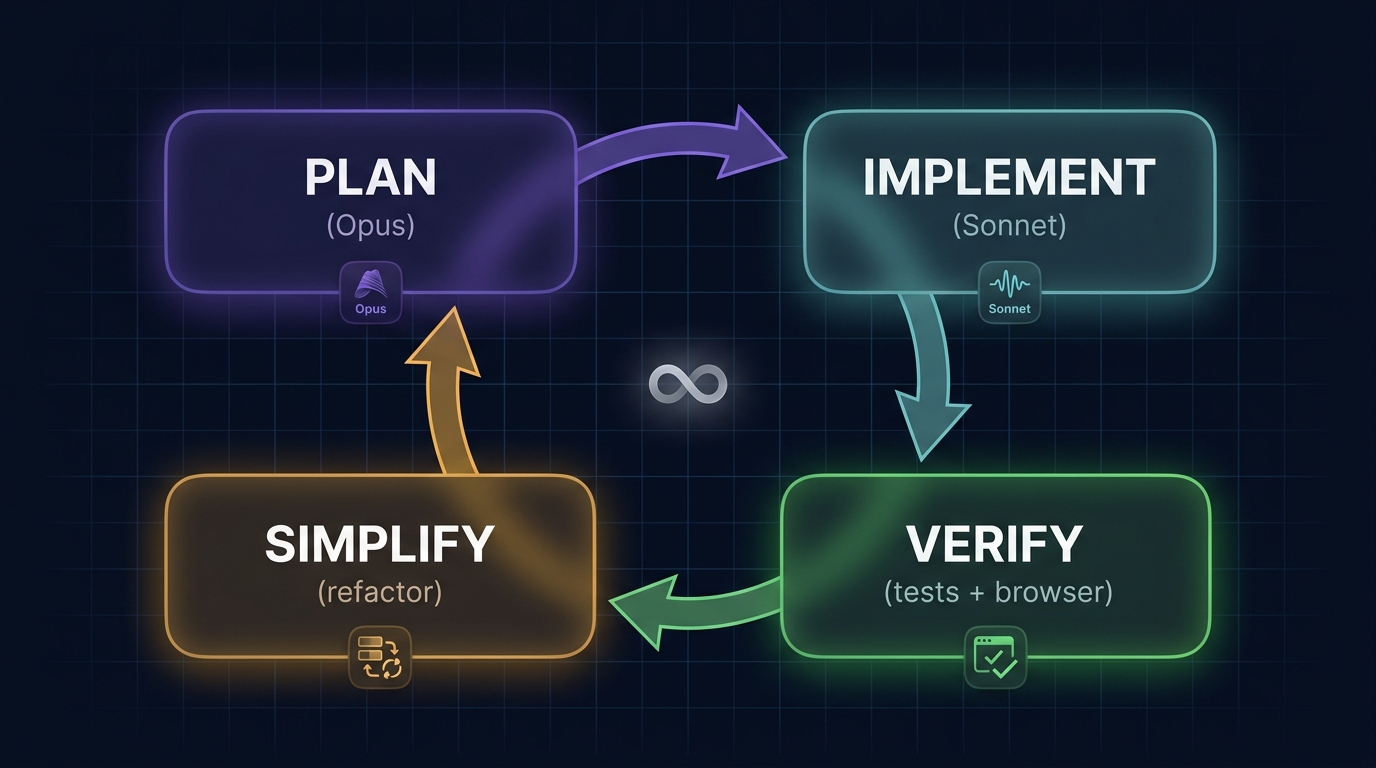 The four-phase loop. Plan with Opus, implement with Sonnet, verify with tests, simplify before merge.
1. Five parallel git worktrees
This is the headline. Boris (Jan 31 thread): “Spin up 3-5 git worktrees, each with its own Claude session. Single biggest productivity unlock, top tip from the team.”
# Set up 5 worktrees off main
for i in 1 2 3 4 5; do
  git worktree add -b feature-$i ../wt-$i main
done

# Open 5 terminal tabs, name them 1-5, start a Claude in each
cd ../wt-1 && claude   # in tab 1
cd ../wt-2 && claude   # in tab 2
# ... etc
Add shell aliases to hop: alias za='cd ~/wt-1', zb, zc. Reserve one worktree as your “analysis” tab — log reading, BigQuery, anything verbose — so noisy data never pollutes your coding context. Configure iTerm2 or Ghostty to fire system notifications when a Claude needs input (the Notification hook above does this on macOS). You’ll know which tab to switch to without checking each one.
Optimise worktrees in settings.json:
{
  "worktree": {
    "symlinkDirectories": ["node_modules", ".cache"],
    "sparsePaths": ["packages/my-app"]
  }
}
.worktreeinclude in your project root copies gitignored files (.env, etc.) into new worktrees so they boot ready-to-run.
2. Plan → Implement → Verify
1. Explore (Plan Mode):  Shift+Tab twice. Read code. Build context. Don't change.
2. Plan:                 "Here's what I want. Output a numbered plan with verify steps."
3. Implement (Normal):   Shift+Tab once to acceptEdits. Claude executes. You watch.
4. Verify (Stop hook):   Tests run. /go invokes verifier subagent. Or press Ctrl+G to review.
Boris (Jan 31): “Pour energy into the plan. A good plan is really important. Then auto-accept edits and Claude usually 1-shots it.”
The team’s twist: two-Claude review. Claude #1 writes the plan. Claude #2 reviews it as a staff engineer. Iterate until clean. Then implement. The cost of a 30-second plan critique is nothing compared to a 30-minute wrong implementation.
3. The verification rule
“Give Claude a way to verify its work. If Claude has that feedback loop, it will 2-3x the quality of the final result.” — Boris Cherny, Jan 2 2026
For each domain:
- Frontend: Playwright MCP or the Claude Chrome extension — opens browser, tests UI
- Backend: bash test commands, curl health endpoints
- Mobile: phone simulator
- Data:
bqCLI to query and assert
The Stop hook above (verify.sh) makes this automatic.
4. The bug-fixing loop
The deterministic version of “fix the bug”: test → fail → fix → commit.
1. Reproduce: "Write a test that reproduces the bug. Show me it fails."
2. Approve the test.
3. "Now make it pass. Don't change anything else."
4. Run the test suite. If anything else broke, fix it.
5. /commit-push-pr.
This is the Karpathy CLAUDE.md rule (#4 — “Goal-Driven Execution”) made concrete. The reproduction test means the bug never silently regresses, and “make it pass” is so much more constrained than “fix the bug” that Claude gets to a clean fix in noticeably fewer turns.
5. Compounding Engineering
Boris’s tip #4 from January: “Anytime we see Claude do something incorrectly we add it to CLAUDE.md so Claude knows not to do it next time.” The team workflow is:
- PR opens.
- Reviewer (human) tags
@claudewith a comment: “This violates rule X.” - The Claude Code GitHub Action sees the mention, appends the rule to
CLAUDE.md, and commits to the PR branch. - Future PRs by Claude don’t make the same mistake.
The mental model is Dan Shipper’s “Compounding Engineering” — every bug fix should leave a permanent rule behind. Pair this with the corollary (“if Claude does X correctly without the rule, delete the rule”) and your CLAUDE.md improves monotonically.
6. The single highest-ROI prompt
After any mediocre fix:
“Knowing everything you know now, scrap this and implement the elegant solution.”
Burn into muscle memory. Universally cited as the single most valuable phrase in 2026. The first implementation is exploration; the second is the one you keep.
A few sibling prompts from Boris’s team:
- “Grill me on these changes and don’t make a PR until I pass your test.” — turns Claude into your reviewer.
- “Prove to me this works.” — Claude diffs behaviour between main and feature branch.
- “Use subagents.” — append to any prompt to fan out.
- “Read the related files first. Then propose an approach. Then wait.” — the no-implement gate.
7. Voice input
Boris (Jan 2): “You speak 3x faster than you type, and your prompts get way more detailed.” Mckay Wrigley: “If you’re not using voice as input, you’re working in the stone age.”
Voice doesn’t just speed you up — it changes the prompts themselves. People naturally provide more detail and rationale verbally than they type. More context in, better results out. Wispr Flow on macOS, or the built-in fn-fn dictation, or anything else that gets your voice into the prompt buffer.
8. Long-running tasks
Boris’s tip #11 from January, paraphrased: for runs that should keep going without supervision, combine three things.
- Verification loop. Either prompt Claude to verify with a background agent when done, or attach a
Stophook that runs the test suite. - Auto-loop. Use the
ralph-wiggumplugin (Stophook re-prompts until<promise>emitted) for spec runs that converge. - Sandbox + permission mode. Run inside a sandbox with
--permission-mode=dontAsk(orbypassPermissionsif and only if isolated). Pre-approve everything safe via/fewer-permission-prompts.
This is how Boris runs overnight refactors. Wake up, check the PR, merge.
9. Pseudocode in the codebase
Sometimes write pseudocode directly into the file as a comment, then ask Claude to implement. Mckay: “Opus is astonishingly good at inferring what you mean.”
// PSEUDO:
// 1. validate input (zod schema below)
// 2. fetch user from db; if !user throw 404
// 3. compute permissions diff
// 4. if changed, write to audit log
// 5. return new permission set
Faster than describing it in chat, more concrete than a docstring, and the comment can stay or go after.
10. Best-of-N
Mckay’s pattern: “In real-world you’d never ask 5 devs to build the same feature. With AI it’s a no-brainer.” Run 5 worktrees on the same task with different prompts, pick the best result. Combine with /code-review to evaluate them. New default for any feature you actually care about.
Anti-Patterns: Stop Doing These
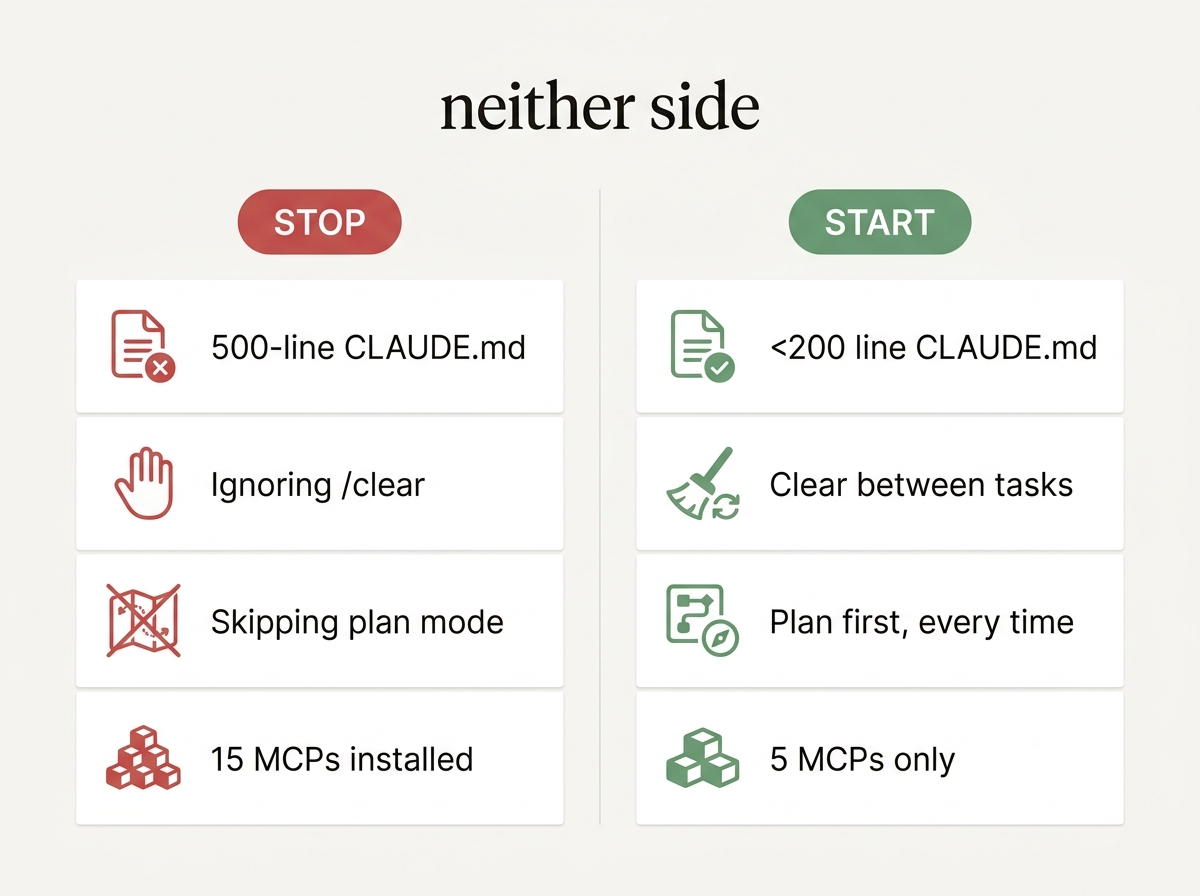 Stop doing the things on the left. Start doing the things on the right.
In rough order of severity:
- Bloated
CLAUDE.md. Anything over 200 lines is functionally ignored. Move deep stuff to skills, which load on demand. --dangerously-skip-permissionsas a daily habit. Run/fewer-permission-promptsonce and put the output in your allowlist. Boris (multiple threads): “NEVER —dangerously-skip-permissions.” SetdisableBypassPermissionsMode: "disable"to physically prevent the flag.- Kitchen-sink sessions. Switching from auth refactor to log analysis without
/clear= degraded performance every message after. Treat/clearas a free reset. - Treating hooks as optional. Hooks are the only deterministic guarantee. CLAUDE.md is advisory. If a rule MUST hold (no
.envwrites, norm -rf, lint runs after every edit), make it a hook. - Correcting the same mistake twice. Add the rule. Compound learning is the entire point.
- Over-installing subagents. Each agent’s frontmatter description loads every session. Five well-tuned > fifty random.
- Over-installing MCPs. 15 day one, 5 after three months. Tool descriptions cost tokens forever.
- Letting auto-compact hit at 95%. Set
CLAUDE_AUTOCOMPACT_PCT_OVERRIDE=80. Performance has already degraded by 95%. - Trust without verification. Always provide a way for Claude to check itself — tests, screenshots, smoke commands. Anthropic calls this its “single highest-impact practice.”
- Vague prompts on important work. “Add input validation to
login()inauth.ts” beats “improve the codebase” by 10x. Voice input naturally fixes this. - Editing
CLAUDE.mdwithout observing whether behavior actually changed. Anthropic’s rule: “If Claude does X correctly without the rule, delete the rule.” - Ignoring
/status. When a setting feels wrong,/statusprints every layer’s contribution. Most “weird Claude behaviour” is “you forgot what you set.” - Running with the wrong permission mode.
defaultis for sensitive work,acceptEditsfor iteration,planfor exploration,autofor long unattended runs. Picking the wrong one is friction theater. - Skipping plan mode on PRs. A 30-second plan critique saves 30-minute wrong implementations. Boris does this every PR — so should you.
Troubleshooting / Common Gotchas
A short list of the traps engineers hit before they know where to look.
”Why is Claude doing that?” → /status
Run /status first, every time. It prints every settings layer’s contribution and the resolution path. Most surprises are “your user ~/.claude/settings.json overrode the project’s defaultMode” or “the managed config has availableModels and your alias resolved to something else.”
Hooks fail silently
Hooks that crash or exit non-zero with the wrong code don’t always surface errors. Two debugging moves:
- Enable the
InstructionsLoadedhook to log what’s being loaded. - Add a wrapper:
command -v jq >/dev/null && bash my-hook.sh; echo "hook exit: $?" >> ~/.claude/hook-debug.log. - Check
~/.claude/logs/— Claude Code writes hook stderr there.
The most common failure: a hook that expects jq on a machine without it, fails silently, behaviour reverts. Pin jq in your dev environment or write hooks in pure bash.
CLAUDE.md getting ignored
Symptoms: Claude makes the mistake your CLAUDE.md explicitly forbids. Top three causes, in order of likelihood:
- File is over 200 lines. Adherence drops off a cliff. Trim.
- Rule is too vague. “Be careful with database calls” → ignored. “Never use
SELECT *in production code; always enumerate columns” → enforced. - Rule contradicts a stronger signal in
auto-memory. Run/memoryto see what’s loaded; toggle auto-memory off if it’s stale.
ultrathink quietly disappeared, then came back
Anthropic removed the ultrathink keyword in late Q1 2026 as part of a system-prompt cleanup. Restored in v2.1.68 after a community revolt — hundreds of bug reports about quality regressions on hard tasks. If you see “ultrathink doesn’t work” advice in stale blog posts, it’s safe to ignore — it works again. Verify with /effort max plus ultrathink in your prompt for genuinely hard problems.
MCP servers not appearing
Run claude mcp list. If a server is missing or shows status error, check ~/.claude/logs/mcp-<servername>.log. Most common: the env var the server needs (CONTEXT7_API_KEY, GITHUB_TOKEN) isn’t actually set in the shell where you launched Claude Code. The ${VAR:-default} expansion in .mcp.json handles missing vars with a default; bare ${VAR} does not.
Sandbox refuses to enable
/sandbox requires bubblewrap + socat on Linux. Install both. On macOS it uses sandbox-exec (built in). On Windows, sandboxing is a no-op — use WSL. Set failIfUnavailable: true so the session refuses to start without a sandbox, which is what you want for any unattended run.
/compact ate something important
This is what the PreCompact hook is for. Before relying on auto-compact, write a PreCompact handler that re-injects must-survive context as additionalContext JSON. Skills carry forward automatically (5KB each, 25KB total budget); subdirectory CLAUDE.md files don’t — only project-root CLAUDE.md is re-injected.
Version pinning
For team environments, pin to the stable channel:
{ "autoUpdatesChannel": "stable" }stable is roughly 1 week behind latest — long enough to skip regression releases. Combine with managed DISABLE_UPDATES for fully-pinned environments where IT controls upgrades.
Permissions bypass via composed bash
The trap: Bash(npm run *) is a prefix match, but Claude can compose npm run lint && rm -rf node_modules. Defence in depth:
- Add a
PreToolUsehook that scans the full command, not just the prefix. - Enable sandboxing.
- Use
dontAskmode in CI so unmatched commands auto-deny rather than auto-allow.
Agents that don’t auto-invoke
Three causes:
- The
descriptiondoesn’t contain trigger phrases your prompts use. Pack it with verbs. - The agent body lacks an
<example>block — Anthropic’s evidence shows multi-example bodies materially raise auto-invocation reliability. - The agent is plugin-distributed and your project has plugin loading disabled.
Fix the description first, almost always.
”It worked yesterday”
Run claude --version. If it auto-updated and started behaving differently, downgrade to the prior version (claude install <version>) and pin via autoUpdatesChannel: "stable". Then check the release notes — every change is documented.
The Drop-In Starter Pack
Spend thirty minutes wiring this up and you’re at the 90th percentile of Claude Code users.
my-project/
├── CLAUDE.md                          # Karpathy 65-line + project specifics. <200 lines hard cap.
├── CLAUDE.local.md                    # Personal overrides (gitignored)
├── .mcp.json                          # Context7 + GitHub + Playwright + Postgres + Slack
├── .gitignore                         # Add: .claude/settings.local.json, CLAUDE.local.md, .claude/worktrees/
├── notes/
│   ├── active.md                      # Current blockers (loaded by SessionStart hook)
│   └── decisions.md                   # Architectural decision log
└── .claude/
    ├── settings.json                  # The annotated power-user JSON above. Committed.
    ├── settings.local.json            # Personal env vars / model overrides. Gitignored.
    ├── agents/
    │   ├── code-architect.md          # Designs blueprints
    │   ├── code-reviewer.md           # Auto after edits
    │   ├── code-simplifier.md         # Boris daily — removes redundancy
    │   ├── silent-failure-hunter.md   # Catches swallowed errors
    │   ├── librarian.md               # Fetches external docs
    │   └── verify-app.md              # End-to-end verifier
    ├── skills/
    │   ├── go/SKILL.md                # Verify+simplify+ship pipeline
    │   ├── sync/SKILL.md              # 7-day cross-tool context dump
    │   └── frontend-design/SKILL.md   # Anti-AI-slop UI
    ├── commands/
    │   ├── commit.md
    │   ├── commit-push-pr.md
    │   ├── code-review.md
    │   ├── techdebt.md
    │   ├── ultrathink-plan.md
    │   ├── rev-engine.md
    │   └── simplify.md
    ├── hooks/
    │   ├── format.sh                  # PostToolUse: prettier/black/gofmt/rustfmt
    │   ├── danger-blocker.sh          # PreToolUse: block rm -rf, fork bombs, curl|sh
    │   ├── protect-files.sh           # PreToolUse: deny .env / secrets / .git edits
    │   ├── verify.sh                  # Stop: run tests; block stop on failure
    │   └── inject-context.sh          # SessionStart: git state + notes/active.md
    └── rules/
        └── api-conventions.md         # paths-scoped: only loads when editing src/api/**
Plus globally on your machine:
~/.claude/
├── CLAUDE.md          # Personal preferences (every project)
├── settings.json      # User-level overrides
├── statusline.sh      # Status line script
└── agents/            # Personal agents (e.g. learning-tutor.md)
The configs are battle-tested, the hooks are executable, and every snippet here has been used on real projects.
Sources & Credits
This setup is a synthesis. The good ideas aren’t mine — they’re stolen, with attribution.
Boris Cherny (@bcherny, the engineer who built Claude Code, 430K followers):
- “How I use Claude Code” — January 2 2026, 54K likes, 8.1M views, 104K bookmarks (the “vanilla setup” thread that started everything)
- “10 tips from the Claude Code team” — January 31 2026, 51K likes, 9.1M views, 104K bookmarks (parallel worktrees, plan mode, hooks, subagents, skills)
- “Dogfooding Opus 4.7” — April 16 2026, 12K likes (Auto Mode,
xhigheffort,/fewer-permission-prompts,/focus, recaps) - howborisusesclaudecode.com — community-built searchable index of 87 indexed tips
Mckay Wrigley (@mckaywrigley, founder of TakeoffAI / AgentShare, 228K followers):
- “Opus 4.5 thoughts” — December 6 2025 (voice input, pseudocode-as-comments, best-of-N worktrees)
- “Claude Agent: 10x Workflows” — Substack (the “best agentic harness in the world” SDK essay)
Anthropic official:
- Claude Code repo (117K stars) — bundled plugins for
code-review,feature-dev,hookify,pr-review-toolkit,commit-commands,security-guidance,frontend-design,plugin-dev,ralph-wiggum - Skills repo (123K stars)
- Hooks reference
- Best practices
- Release notes through v2.1.119 (April 2026)
Community repos worth bookmarking:
forrestchang/andrej-karpathy-skills(86K stars) — the 65-line CLAUDE.mdgarrytan/gstack(83K stars) — Garry Tan’s actual setup, 23 opinionated toolsshanraisshan/claude-code-best-practice(48K stars) — the reference implementationhesreallyhim/awesome-claude-code(41K stars) — canonical awesome listwshobson/agents(34K stars) — 184 agents, 79 plugins, 150 skills, 98 commandsVoltAgent/awesome-claude-code-subagents(18K stars) — 100+ specialized subagentsvijaythecoder/awesome-claude-agents(4K stars) — orchestrated 24-agent team, strict-format orchestratorjarrodwatts/claude-code-config(1K stars) — the XML-style senior-engineer pattern with Phase 0 Intent Gateabhishekray07/claude-md-templates— the 3-level CLAUDE.md hierarchydavila7/claude-code-templates— 40+ JSON hook recipes + statusline gallery + CLI installeranthropics/claude-code/plugins/security-guidance— the eight-pattern security reminder hookanthropics/claude-code/plugins/ralph-wiggum— the auto-loop plugin
Sources
- Boris Cherny — How I use Claude Code (X)
- Boris Cherny — 10 tips from the Claude Code team (X)
- Boris Cherny — Dogfooding Opus 4.7 (X)
- Boris Cherny on X
- howborisusesclaudecode.com
- Mckay Wrigley — Opus 4.5 thoughts
- Mckay Wrigley — Claude Agent (10x Workflows)
- Mckay Wrigley on X
- Anthropic — Claude Code repo
- Anthropic — Skills repo
- Anthropic — Hooks reference
- Anthropic — Claude Code best practices
- Agent Skills standard
- wshobson/agents (GitHub)
- Claude Code settings.json schema